SaaS On-Page SEO: How to Optimize Pages for Traffic & Conversions
SaaS on-page SEO is about structuring every page, product, feature, blog, and landing pages around user intent, complex buyer journeys, and conversion-driven content. Unlike traditional websites, SaaS businesses must educate, build trust, and guide users through longer decision cycles, often within a single page. That means aligning headings, copy, internal links, and UX elements to answer specific questions while moving prospects closer to a signup or demo.
Organic search is a primary growth engine. In fact, organic search drives around 53% of all website traffic on average, including SaaS businesses. This makes on-page SEO for SaaS companies one of the most critical levers for visibility, acquisition, and long-term ROI. Yet, most SaaS pages fail to perform because they don’t properly match search intent or connect content to product value.
Key Takeaways
- Match content to user intent for better visibility and engagement.
- Optimize meta titles and URL structure to improve click-throughs.
- Use internal links and clear headings to boost site authority.
- Balance technical fixes with high-value content for lasting results.
- Measure traffic and refine keywords to attract qualified visitors.
What Is SaaS On-Page SEO
SaaS on-page SEO is the process of optimizing individual pages on a SaaS website, such as product pages, feature pages, landing pages, and blog content, to rank higher in search engines and convert visitors into users.
Unlike traditional on-page SEO, SaaS on-page SEO focuses heavily on user intent across the entire buyer journey. This means creating and structuring content that not only targets keywords, but also educates, builds trust, and clearly explains how the product solves specific problems.
- Design page structure so important product pages are easy for search engines to crawl and users to scan.
- Include clear URLs, helpful links, and example case information to demonstrate value and build authority.
- Turn your blog and resource center into a hub that guides visitors toward trials and demos.
Consistent, user-first strategy drives traffic and converts visitors into qualified leads. Small, deliberate improvements to content and structure produce better ranking results over time.
Why SaaS Companies Need a Specialized SEO Approach
Business software marketing must account for long evaluation cycles and many decision-makers. A single product page often serves several roles: technical vetting, pricing comparison, and integration checks.
Growth shapes expectations: the industry is forecast to grow rapidly, reaching a projected $236.69 billion valuation by 2032. That scale raises competition for visibility and authority in search results.
Differences from Traditional Search Work
Unlike retail, success depends on recurring revenue and trust over time. Your site must show product value across multiple pages and through case examples that help different users.
The Role of Search Demand
Identify the specific keywords and feature questions your audience uses. Focus on decision-intent queries to attract visitors who compare pricing, integrations, and support.
- Optimize titles and meta to set clear expectations.
- Build a structure that links blog resources to product pages for authority.
- Use analytics and tools to find demand for feature-level content.
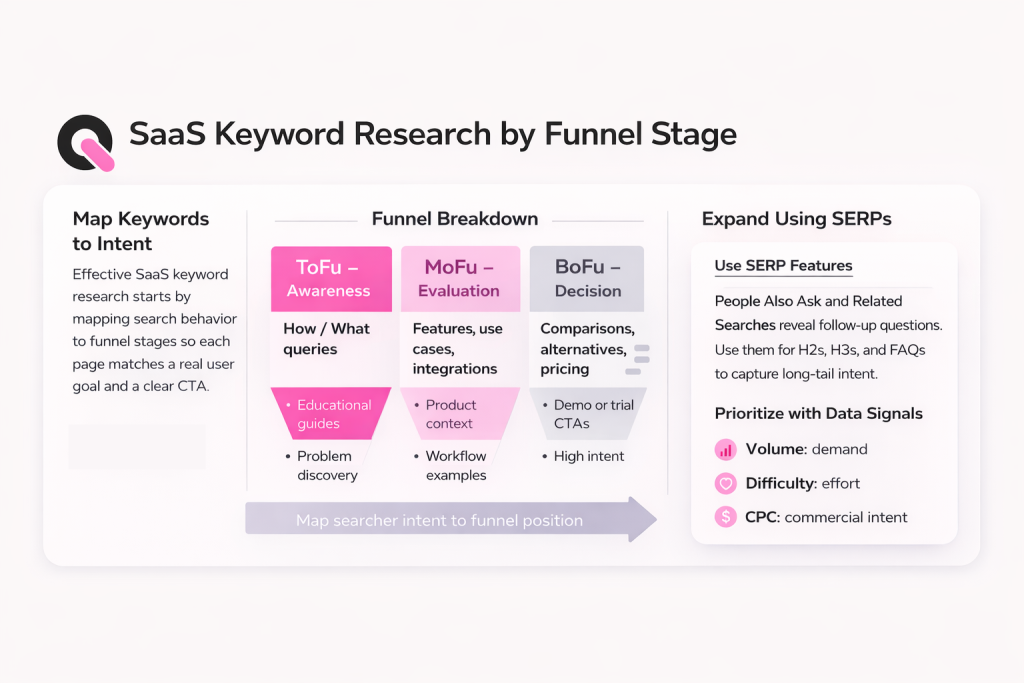
Mapping the SaaS Sales Funnel to Search Intent
Search intent shifts as prospects move from awareness to purchase, and your content should shift too, matching the SaaS SEO funnel.
Top-funnel visitors often ask broad “how-to” questions. Build informational content that answers those queries plainly.
Middle-funnel users compare features and costs. Create comparison pages, integration guides, and clear meta titles that set expectations. These pages nudge visitors toward trials and demos.
Bottom-funnel pages must prove value. Add case studies, customer examples, and pricing pages that remove friction. Use strong proof points so evaluators feel confident to act.
- Align blog topics with awareness searches to attract organic traffic.
- Link comparison and product pages to show clear next steps for users.
- Optimize urls and titles for commercial intent to improve click-throughs.
| Funnel Stage | Search Intent | Page Example |
| Awareness | Learn how-to | How-to guide on reducing workflow friction |
| Consideration | Compare features | Feature comparison and integration guide |
| Decision | Buy/Trial | Pricing, demo request, and case study pages |
Measure which pages bring qualified visitors and use that data to refine keywords and content. A focused seo strategy plus intentional site structure increases visibility, builds authority, and improves conversion results over time.
Technical Foundations for Search Engine Accessibility
A healthy website starts with fixes that let crawlers and users access your most important pages. Technical SEO for SaaS does the heavy lifting so content and titles can deliver results. A focused audit reveals what blocks traffic and wastes ranking potential.
Fixing Crawl Blockers
Run site crawls with tools to spot blocked paths, robots rules, and missing sitemaps. Unintended disallow rules or noindex tags can hide critical product and blog pages.
Address 4xx and 5xx responses quickly so visitors do not hit dead ends. Fixing these errors restores trust and helps engines index key pages.
Consolidating Duplicate Content
Use canonical tags to consolidate similar pages and protect site authority. Consistent URLs, clean parameters, and clear meta choices stop dilution across versions.
Improving Page Rendering
Test JavaScript-heavy pages to ensure crawlers and users see the same content. Server-side rendering or dynamic rendering can make product features visible to search engines.
Keep page load times low; fast rendering improves user experience and supports better ranking outcomes.
- URL & sitemap management: logical structure and accurate sitemaps help crawlers find pages.
- Tools: regular scans and monitoring catch regressions early.
- Audit strategy: prioritized fixes produce measurable improvements over time.
| Issue | Root Cause | Fix |
| Blocked pages | Robots or noindex | Update directives, resubmit sitemap |
| Duplicate content | Multiple URLs | Set canonicals, consolidate links |
| Poor rendering | Client-side only JS | Implement server-side or dynamic rendering |
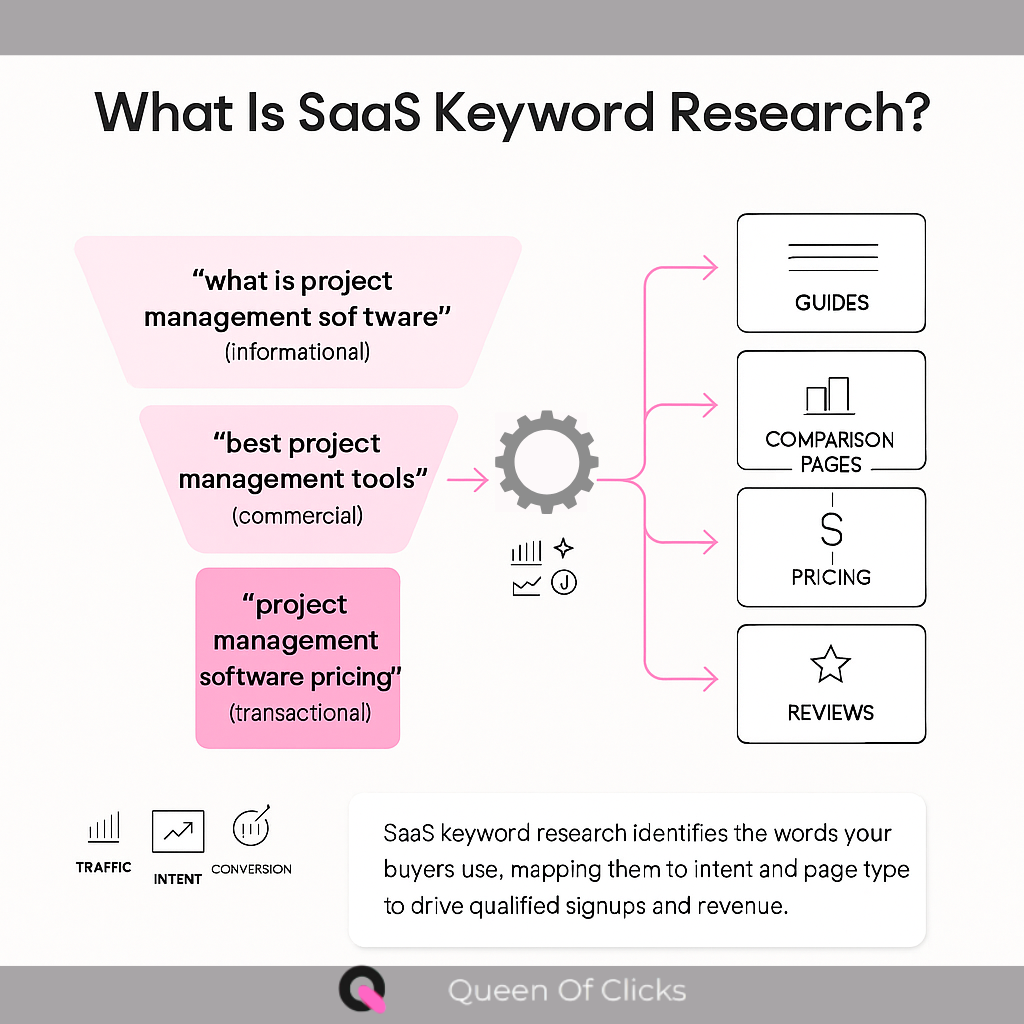
Conducting Keyword Research for SaaS Growth
To do SaaS keyword research, map the questions and error messages your users type into search boxes. This reveals intent across the buyer journey and surfaces niche technical queries that competitors miss.
Use advanced tools like Ahrefs and Semrush to find high-potential terms that balance volume and difficulty. Prioritize keywords that match user intent, from “how-to” guides to trial and pricing queries.
Identify “error keywords” and support queries to capture visitors troubleshooting integrations or bugs. These queries often convert well because they show active product use.
- Build a list covering awareness, consideration, and decision terms.
- Map each keyword to a specific page or blog post on your site to avoid internal competition.
- Include title and meta ideas so writers can produce aligned content quickly.
Update this plan over time. Markets change, product features evolve, and new queries emerge. Regular reviews keep your content and pages aligned with what users search for and improve long-term ranking and traffic results.
Optimizing Page Structure for User Experience
Users scan pages in seconds, so your layout must show value at a glance.
Start with a clear hierarchy. Use H1 and H2 headings to set expectations. Place the most important content near the top so visitors see key benefits fast.
Creating Scannable Page Layouts
Design short paragraphs, bolded subheads, and concise lists so busy professionals can scan and act. Break technical details into expandable sections to keep pages uncluttered.
- Use strategic internal linking to connect related pages and guide users toward demos or support.
- Keep calls to action visible and specific; each page should drive the next step.
- Optimize titles and meta elements to reflect intent and improve click-throughs from search and social.
Structure matters: a logical site map keeps product and support content close to the homepage. That reduces clicks and improves engagement.
Crafting High-Quality Content for SaaS Audiences
High-value software pages win attention when they answer practical business problems in plain language.
Map your audience: job roles, workflows, and the exact pain points your product solves. Create content that speaks to those needs with clear examples and measurable outcomes.
Demonstrate E-E-A-T with author bios, real case studies, and data points that prove value. Users and search engines reward trustworthy content that shows expertise and real experience.
Build a content library that answers common questions across the B2B funnel. Use concise titles, targeted meta snippets, and useful internal links so visitors can move from blog posts to product pages easily.
- Keep language simple: avoid jargon and explain benefits in terms that business users understand.
- Integrate keywords naturally: prioritize readability over density to retain trust and improve rankings.
- Publish consistently: a steady schedule builds authority and drives repeat traffic over time.
Each page should be a resource that earns shares and backlinks. Focus on useful, actionable content and the long-term results will follow.
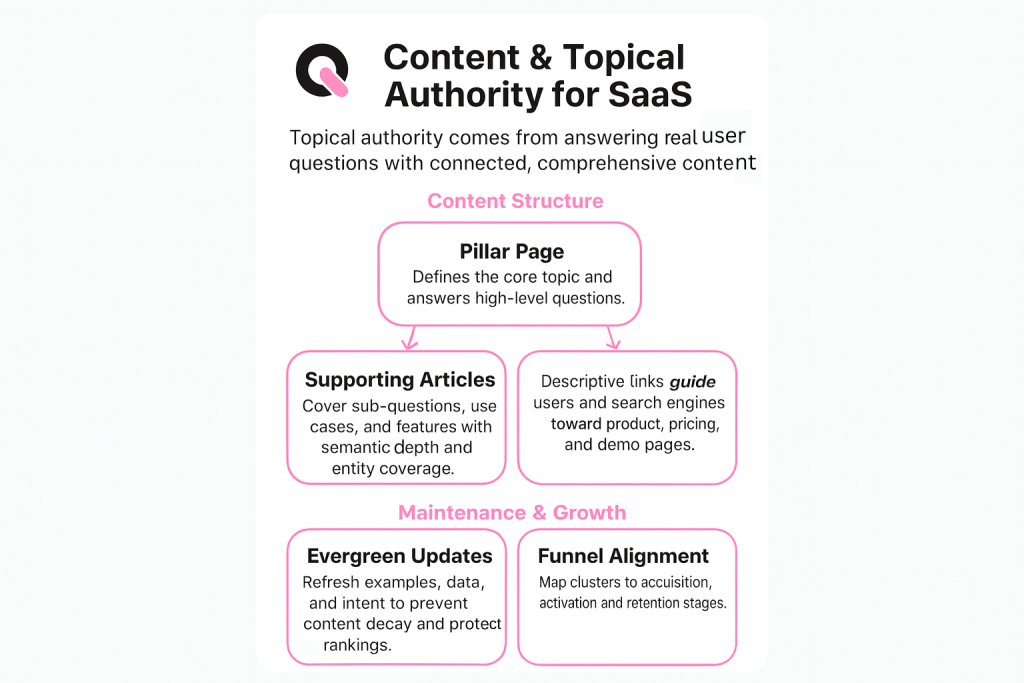
How to Create Topic Clusters and Pillar Pages
A focused pillar page acts like a hub that organizes deep content and guides visitors through related topics. Use a pillar to present the main theme, then link to narrow, actionable subtopic pages that answer specific questions.
Defining Pillar Page Strategy
Pick core themes that match your ideal customer and business goals. Make the pillar comprehensive but scannable.
Include clear meta title and a strong introduction that sets expectations. Link to product pages, case studies, and how-to guides to show value and build authority.
Organizing Subtopic Clusters
Create subpages that target long-tail keywords and precise user intent. Each subtopic should link back to the pillar to strengthen internal linking and keep readers on your site longer.
- Map clusters to audience questions and use expected search terms in headings.
- Measure which pages drive traffic and conversions, then iterate on content and structure.
- Keep URLs logical so users and engines can follow the relationship between pages.
Mastering Meta Tags and Search Snippets
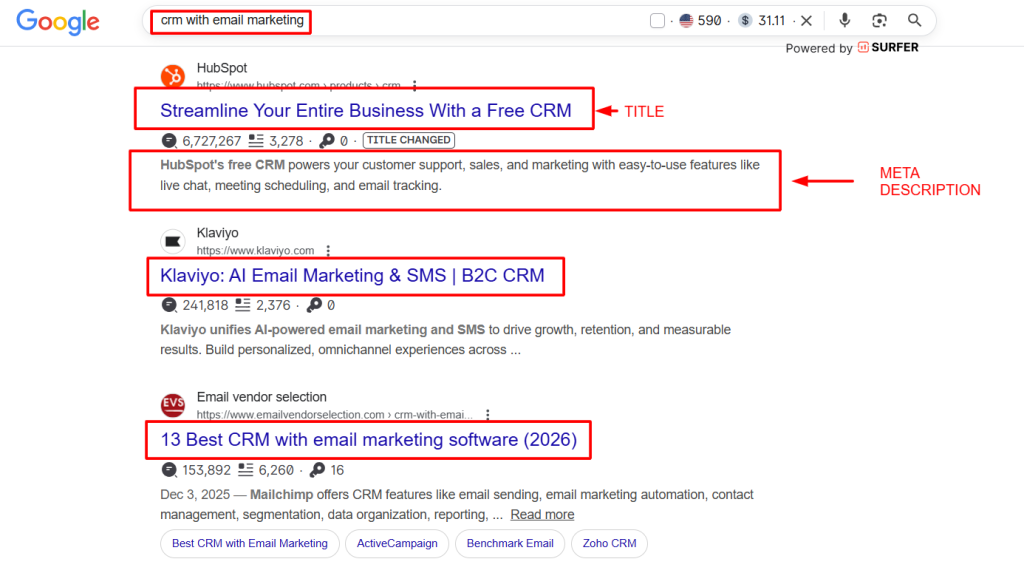
Clear snippets shape first impressions in search results. A concise title tag and meta description decide whether people click your listing or keep scrolling.
Optimize every title tag to include your primary keyword and a compelling benefit. Keep titles under 60 characters when possible so search engines show them intact.
Meta descriptions summarize page content and sell the value of your product. Use active language, highlight outcomes, and include a call to action to attract visitors.
- Make each meta unique: prevent duplicate tags across pages to protect ranking and clarity.
- Use schema markup: add structured data for pricing, reviews, and breadcrumbs so search engines understand page details.
- Monitor snippets: track impressions and click-through rate and adjust title tags and meta text over time.
| Element | Purpose | Quick Tip |
| Title tag | Signal topic to users and engines | Include keyword + benefit |
| Meta description | Summarize content for visitors | Be specific and action-oriented |
| Schema markup | Provide structured information | Use product, review, and price types |
Proper meta management is a core part of a stronger marketing strategy. When your page snippets match user intent, your site attracts more qualified traffic and builds authority over time.
Improving Visibility with AI Search Optimization
When AI pulls together answers, it favors content that is concise, verifiable, and well-structured. That changes how teams should write product pages and marketing copy.
Optimizing for AI overviews
Focus on short, factual paragraphs that directly answer common questions. Use clear headings and lists so assistants can extract snappy excerpts.
- Mark up features with structured data so machines understand product attributes and pricing.
- Publish original case examples and customer evidence that show measurable outcomes.
- Keep meta titles and lead lines precise to improve chances of being chosen for an overview.
Trust and authority matter. Follow E-E-A-T principles: show experience, cite sources, and keep facts current. AI systems prioritize trustworthy sites when composing search results.
| Focus | Action | Benefit |
| Concise answers | Use clear headings and short paragraphs | Higher chance to be quoted by assistants |
| Structured data | Implement product and FAQ schema | Improved visibility in search results |
| Unique examples | Publish case studies with metrics | Stronger authority and more user trust |
- Audit top pages for extractable answers and add structured snippets.
- Update content regularly to keep facts accurate for AI citation.
- Monitor traffic and mention patterns to refine the strategy over time.
Building Authority Through Strategic Internal Linking
Internal links are the quiet highways that carry authority across your website. A clear linking plan helps search engines find and value your most important pages.
Map your site so high-value product pages collect links from top-performing blog posts and guides. This directs users and spreads ranking signals to pages that drive conversions.
Use descriptive anchor text to provide context. Good anchors tell both people and engines what to expect on the linked page.
- Guide visitors from informational content to product and case pages to reduce bounce and increase time on site.
- Audit links regularly to fix broken URLs and maintain a clean structure as you publish new content.
- Make every link purposeful so users find answers and move through the funnel.
Measuring Success with an Analytics Stack
A robust analytics stack turns vague traffic numbers into clear business actions.
Wire Google Analytics 4 and Google Search Console to your site. These tools show how visitors find pages, which keywords bring intent, and which content leads to demos or trial sign-ups.
Track specific events, trial starts, demo requests, and form completions, so you can link conversions back to a page, title, or meta snippet. That makes it possible to prove the ROI of your marketing work.
- Build custom dashboards that show ranking, organic results, and conversion paths in one view.
- Monitor user behavior to spot pages losing traffic and fix links, url structure, or content gaps.
- Report regularly so teams see value, adjust keywords, and prioritize pages that drive customers.
| Metric | Source | Why it matters |
| Conversions | GA4 events | Shows which pages create customers |
| Visibility | Search Console | Tracks clicks, impressions, and ranking |
| User paths | Combined dashboards | Identifies drop-off points and value opportunities |
Scaling Your Content Marketing Workflow
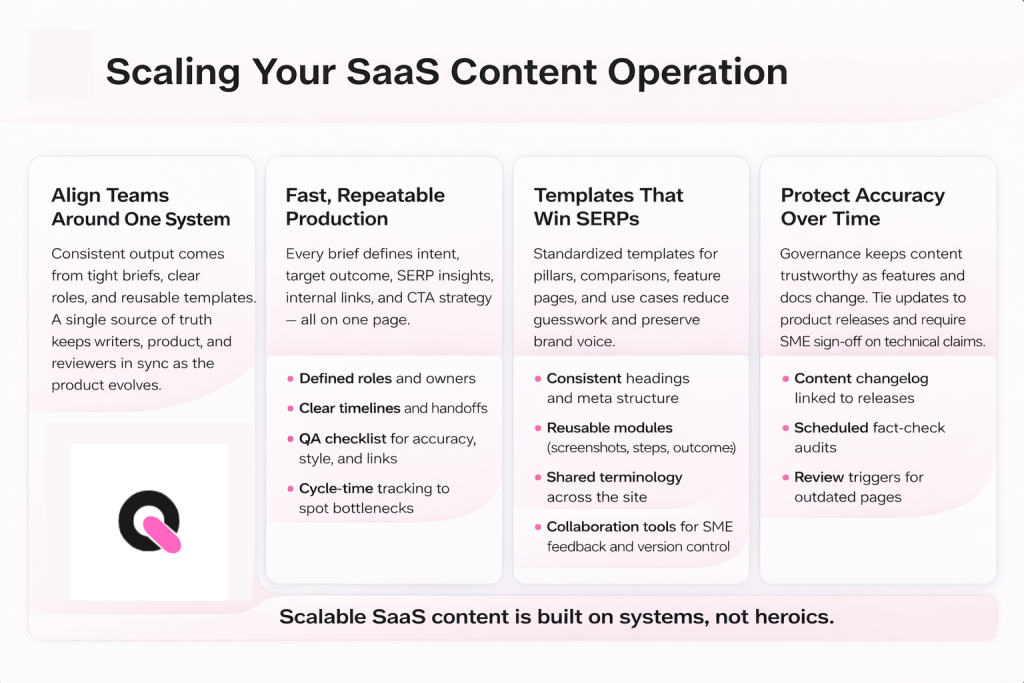
A clear publishing pipeline helps teams produce more high-value pages without adding chaos.
Document each step: idea, research, draft, edit, publish, and review. That creates transparency and keeps every page aligned with your content strategy and audience goals.
Use a project tool to track assignments, deadlines, and keywords for each page. This prevents missed opportunities and speeds approvals across writers, designers, and product owners.
Build templates for common page types, feature pages, case studies, and blog posts, so authors follow the same structure and metadata rules. Templates save time and protect authority as you scale.
Measure publishing cadence and the effect on traffic and ranking. Review which pages drive trials or demo requests and double down on similar topics and formats.
- Repeatable process: reduces review time and keeps quality consistent.
- Tooling: centralizes assets, urls, and keyword tracking.
- Cadence review: ensures the site stays fresh and authoritative.
🚀 How Queen of Clicks Helps SaaS Businesses
We help software teams turn scattered pages into a cohesive website that drives repeatable results. Queen of Clicks scales digital marketing through expert-led strategies and measurable outcomes.
What we deliver:
- Specialized support to optimize every page and attract qualified customers.
- High-quality content and technical foundations that position your product as an industry leader.
- Data-driven execution that doubled a client’s conversion rate from 0.56% to 1.16% in a recent case.
- A dedicated team focused on long-term growth and recurring revenue.
Why it matters: better pages and clearer site structure produce higher conversions and stronger organic visibility. Let us handle the complexity so you can build the best software for your customers.
Book a call: speak with our experts to map a plan tailored to your website and growth goals.
Conclusion
Small, consistent changes to each page compound into measurable business results, and that work begins with a clear audit of your site.
Focus first on technical health, keyword research, and useful content that answers real user questions. These three areas build authority and invite qualified leads.
Make regular checks part of your workflow. Improve high-impact pages, track outcomes, and iterate on what works. Over time, clear efforts on content and structure deliver better visibility and conversion.
Audit current performance, prioritize quick wins, and commit to steady improvement. With patience and a data-driven approach, your website will become a reliable engine for recurring revenue and growth.
FAQs
How long does it take to see results from SaaS on-page SEO?
On-page SEO for SaaS typically takes 3–6 months to show measurable improvements in rankings and traffic. However, small optimizations like better meta titles or internal links can deliver quicker wins within weeks.
How often should SaaS companies update their on-page SEO?
You should review and update key pages every 3–6 months. Product updates, new features, and changing search trends mean your content needs to stay fresh to remain competitive.
What are the most common on-page SEO mistakes SaaS companies make?
Common mistakes include targeting the wrong keywords, creating thin content, ignoring internal linking, and using duplicate meta tags across pages.
Should SaaS companies prioritize blog content or product pages?
Both are important. Blog content attracts top-of-funnel traffic, while product pages convert visitors. The key is linking them strategically to guide users through the funnel.
Is it necessary to use SEO tools for on-page optimization?
While not mandatory, SEO tools like Ahrefs or SEMrush make it much easier to identify keyword opportunities, track performance, and find technical issues.
How do you optimize SaaS landing pages for conversions and SEO?
Combine clear messaging, strong value propositions, optimized meta tags, and visible CTAs. Align the page with search intent while guiding users toward demos or trials.
Can small SaaS companies compete with larger competitors in SEO?
Yes. By targeting niche, long-tail keywords and focusing on specific use cases or industries, smaller SaaS companies can outrank bigger players in targeted searches.