A Visual Guide to Keyword Targeting and On-Page SEO for Boosting Website Traffic
Did you know that 75% of users never scroll past the first page of search results? That’s where our visual guide comes in. With a proper keyword research and on-page optimization, you can significantly boost your website’s visibility and search engine ranking. From selecting the right keywords to optimizing meta tags and content, this guide provides insights accompanied by visually engaging illustrations to improve your SEO efforts.
Key Takeaways
- Effective keyword targeting and on-page SEO improve search visibility and attract high-intent organic traffic.
- Understanding keyword intent, informational, navigational, and transactional, helps you align content with what users actually want.
- Natural keyword integration, including LSI, synonyms, and long-tail variations, strengthens content relevance without compromising readability.
- On-page SEO elements like optimized title tags, headers, image alt text, internal links, and technical performance significantly boost rankings and user experience.
- Continuous monitoring of keyword performance, rankings, and user behavior enables ongoing refinement of your SEO strategy for sustained traffic growth.
Understanding the Importance of Keyword Targeting and On-Page SEO
Keyword targeting involves strategically selecting relevant keywords that users are likely to search for, and optimizing your content around those keywords to improve search engine rankings.
On-page SEO refers to the optimization techniques applied directly on your website pages to enhance their visibility in search engine results. When you implement effective SEO strategies, you can attract more targeted traffic to your site, improve user experience, and boost your online presence.
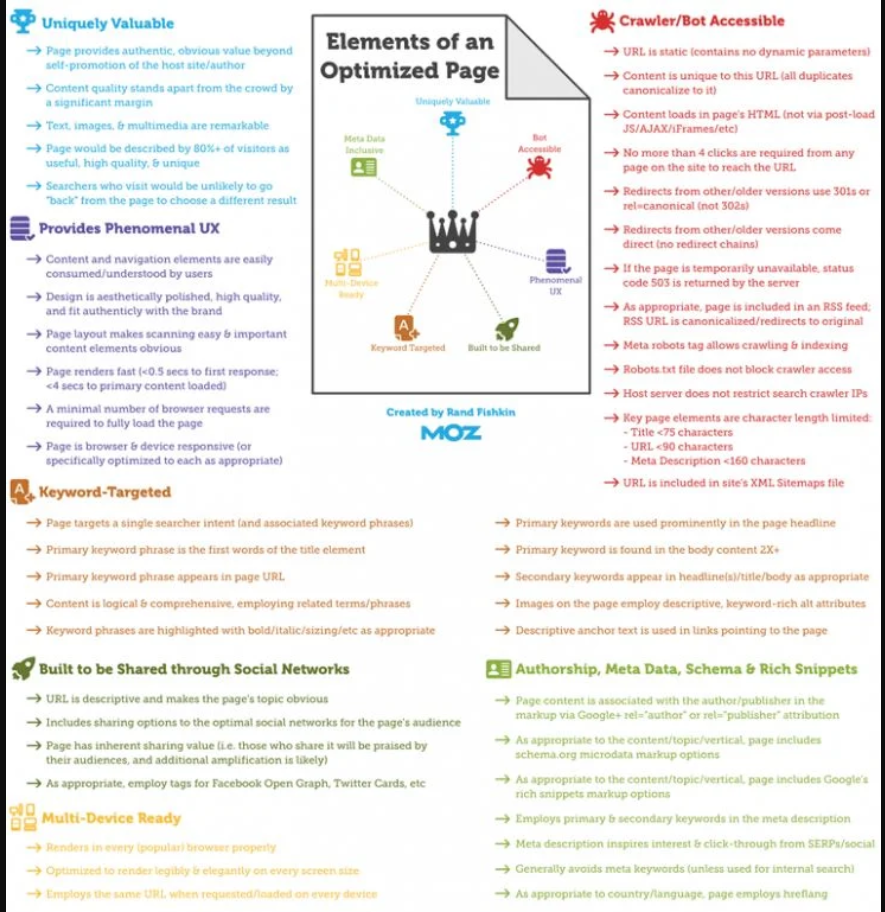
Source: Moz
The Fundamentals of Keyword Research
Keyword research is the process of identifying and analyzing search terms that users enter into search engines, important for understanding user intent and optimizing content to drive relevant traffic to a website.
What are Keywords and Why Are They Important?
Keywords are specific words or phrases that describe the main topics of a piece of content. They help search engines understand the relevance of your content to users’ search queries.
When you use relevant keywords strategically in your content, you can improve your website’s visibility and ranking on search engine results pages.
Identifying Keyword Intent
Analyzing keywords involves examining the language used in search queries to determine intent. Keywords can be categorized as informational (e.g., “how to tie a tie“), navigational (e.g., “Facebook login“), or transactional (e.g., “buy iPhone online“). Consider modifiers like “how,” “best,” or “buy” for further insight.
- Informational keywords typically signify that the user is seeking knowledge or answers to a question, such as “how to tie a tie” or “best practices for digital marketing.”
- Navigational keywords indicate that the user is looking for a specific website or online destination, such as “Facebook login” or “YouTube homepage.”
- Transactional keywords suggest that the user is ready to make a purchase or engage in a specific transaction, like “buy iPhone online” or “discounted laptop deals.”
Put yourself in the shoes of the searcher. What are they likely trying to accomplish with this search? Are they looking for information to solve a problem, trying to find a specific website, or ready to make a purchase? Understanding the user’s intent behind the search helps you align your content with their needs.
Assessing keyword difficulty and competition
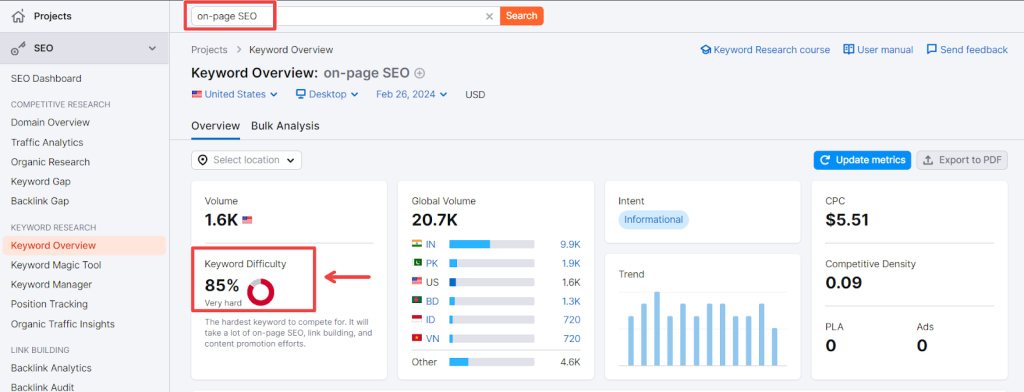
Use keyword research tools like SEMrush, Ahrefs, or Moz to gather data on metrics such as search volume, keyword difficulty score, and the number of competing pages. A higher keyword difficulty score indicates tougher competition, while a lower score suggests easier ranking opportunities.
For example, the keyword difficulty for the keyword on-page SEO is 85, which means is very difficult to rank for.
Types of Keywords: Short-tail vs. Long-tail Keywords
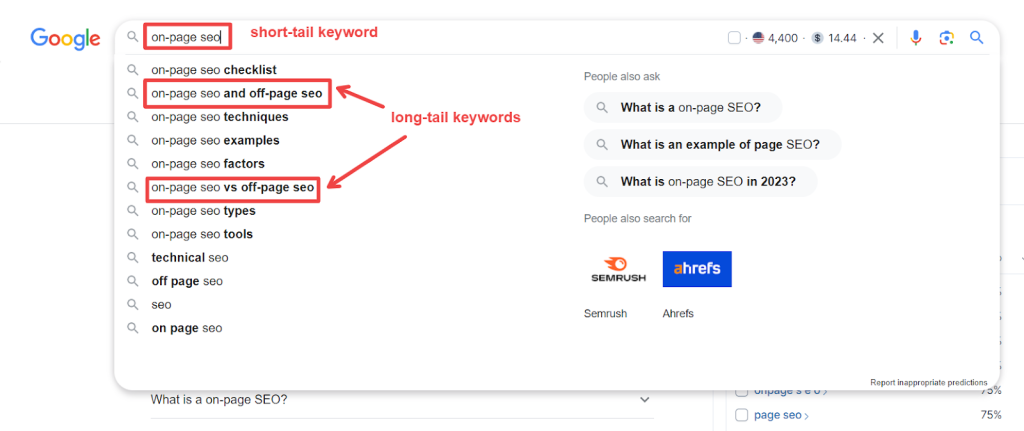
Short-tail keywords are typically shorter and more generic terms, often consisting of one or two words. They are broad and general, making them highly competitive in search engine rankings.
On the other hand, long-tail keywords are longer phrases that are more specific and targeted. They usually contain three or more words and cater to a niche audience. While they may have lower search volume, they tend to have higher conversion rates due to their specificity.
Short-tail keywords are best for reaching a wide audience and increasing visibility, while long-tail keywords are ideal for targeting a specific audience and driving quality traffic to a website.
Organizing Selected Keywords
Categorize keywords based on themes or topics relevant to your business or content. Create separate keyword lists or groups for each category to streamline your efforts. Next, prioritize keywords based on factors such as search volume, competition level, and relevance to your target audience. You can use tools like spreadsheets or keyword management platforms to keep track of your keyword lists and associated data.
Consider creating a hierarchy or tagging system to further organize and classify keywords based on their importance or stage in the buyer’s journey. Regularly review and update your keyword organization to ensure alignment with your evolving business goals and content priorities.
Tools for Effective Keyword Research: Google Keyword Planner, SEMrush, and Ahrefs
Google Keyword Planner, SEMrush, and Ahrefs are powerful tools that can help marketers identify the most relevant keywords for their campaigns.
- Google Keyword Planner is a free tool provided by Google that allows users to discover new keywords and get insights into the search volume and competition levels.
- SEMrush is a comprehensive SEO tool that not only helps with keyword research but also provides competitive analysis, site auditing, and backlink analysis.
- Ahrefs is another popular SEO tool known for its robust keyword research capabilities, backlink analysis, and site auditing features.
Incorporating Keywords in Content Naturally and Effectively
Integrate relevant keywords into your content, you can improve your website’s visibility and ranking on search engine results pages.
When incorporating keywords, prioritize user experience and readability. Avoid keyword stuffing, as it can harm your SEO efforts and deter readers from engaging with your content.
Strategically placing keywords in headings, subheadings, meta descriptions, and throughout the body of the content can help search engines understand the context of your page. Utilizing long-tail keywords and synonyms can also enhance the natural flow of your content while targeting a broader range of search queries.
LSI Keywords
LSI (Latent Semantic Indexing) keywords are terms and phrases that are semantically related to the main keyword or topic of a piece of content. These keywords are conceptually linked and help search engines understand the context and relevance of the content.
Incorporating LSI keywords enhances the comprehensiveness and depth of your content, making it more valuable to both users and search engines.
Let’s say you’re writing a blog post about “healthy eating habits.” Your main keyword is “healthy eating habits,” and some related LSI keywords could include “balanced diet,” “nutritious foods,” “meal planning,” “portion control,” “whole grains,” “fresh vegetables,” “lean proteins,” and “healthy lifestyle choices.”
Synonyms and Related Keywords
Synonyms and related keywords are terms that share similar meanings or are closely related to the main keyword or topic of a piece of content. While synonym keywords directly replace the main keyword with similar terms, related keywords expand upon or provide additional context to the main topic. Incorporating synonyms and related keywords helps to diversify the vocabulary used in your content, making it more natural and appealing to readers while also signalling to search engines the breadth and depth of your expertise on a particular subject.
For example, if your main keyword is “digital marketing,” synonym keywords could include “online marketing” or “internet advertising,” while related keywords might encompass “SEO strategies,” “social media campaigns,” or “content marketing tactics.” Integrating these synonyms and related keywords into your content enriches its semantic relevance, enhances its searchability, and drives more organic traffic to your website.
Keyword Density
Keyword density refers to the percentage of times a particular keyword or phrase appears in a piece of content compared to the total word count. While it was once a significant factor in SEO, search engine algorithms have evolved to prioritize content quality and relevance over keyword density alone.
Identifying keyword density involves calculating the ratio of a keyword’s frequency to the total word count in the content. To avoid keyword stuffing, which can negatively impact SEO and user experience, aim for a natural distribution of keywords throughout the content. This means incorporating keywords in a way that feels organic and relevant to the topic, rather than forcibly inserting them unnaturally.
If keyword density appears too high, consider revising the content to diversify the language used and remove any instances of excessive repetition. Alternatively, if keyword density is too low and the content lacks keyword relevance, strategically add variations of the keyword or related terms to improve its SEO performance without compromising readability.
Numerous online tools and plugins are readily available to assist in calculating keyword density effortlessly. These tools range from simple online calculators to more advanced SEO software suites. Platforms like Yoast SEO, SEMrush, and Moz offer features that not only calculate keyword density but also provide comprehensive insights into overall content optimization. These tools analyze the frequency of target keywords and their variants, helping users ensure that their content strikes the right balance between SEO optimization and readability.
Implementing On-Page SEO Techniques for Better Visibility
On-page SEO techniques can enhance visibility, as they optimize the website content, structure, and elements to align with search engine algorithms and user intent, thus improving rankings in search engine results pages.
Title Tags and Meta Descriptions Optimization
Title tags and meta descriptions improve your site’s visibility on search engine results pages (SERPs) and increase click-through rates.
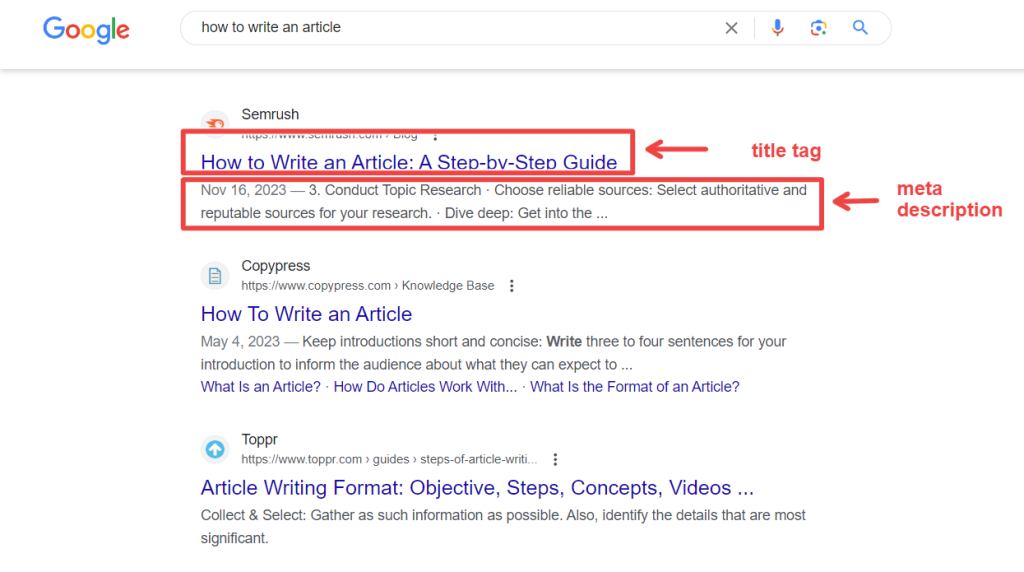
Title tags are HTML elements that define the title of a web page. They appear as clickable headlines in search engine results. Meta description, on the other hand, provides a brief summary of the page content below the title tag.
Optimizing the page title tags involves using relevant keywords, creating compelling and concise titles that accurately reflect the page content, and staying within character limits to ensure full visibility on SERPs.
Meta descriptions should also contain relevant keywords and provide a clear, enticing summary that encourages users to click through to your website. Optimizing these elements can lead to higher organic traffic and better user engagement with your site.
Optimizing Header Tags with Targeted Keywords
Optimizing header tags, specifically H1 to H3, with targeted keywords will improve the SEO performance of a webpage. Each header tag serves a unique purpose in organizing content and signaling its importance to search engines.
When optimizing header tags, place relevant keywords within these tags to enhance the page’s visibility for specific search queries. When you align the content of each header tag with the targeted keyword, you can improve the overall relevance and ranking potential of your webpage.
Utilizing a hierarchical structure from H1 as the main heading down to H6 for subheadings helps search engines better understand the content’s context and significance. This structured approach not only benefits SEO but also enhances user experience and makes it easier for visitors to navigate and comprehend the content.
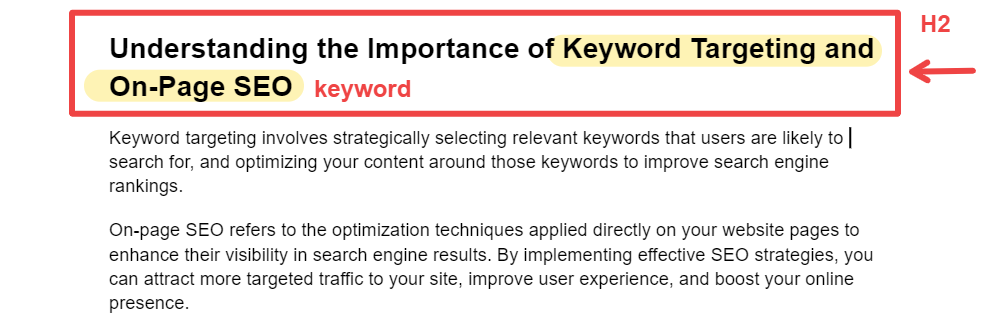
Image Alt Text and Name
Alt text, short for alternative text, is a descriptive attribute added to HTML code that provides textual descriptions of images on web pages. Similarly, image titles are brief text descriptions that appear when users hover over an image. Both alt text and image titles improve accessibility for users with disabilities, enhancing user experience, and providing search engines with valuable context about the content of images.
Including relevant keywords in alt text and image titles can also help improve the visibility of web pages in image search results. When writing alt text for images, be descriptive and concise, accurately conveying the content and purpose of the image in a few words.
The alt text should be specific and relevant to the image, avoiding generic descriptions. For example, instead of simply saying “man,” consider adding context like “smiling man using a laptop in a coffee shop.”

Internal linking and anchor text
Internal linking plays a pivotal role in any comprehensive on-page SEO strategy. When you link relevant pages within your website, you create a network of connections that not only aids in navigation for users but also signals to search engines the importance and relationship between different pages. This helps search engine crawlers understand the structure and hierarchy of your website, ultimately improving its overall visibility and rankings.
Internal linking also distributes link equity throughout your site, boosting the authority of important pages and ensuring that all content receives proper attention. It encourages visitors to explore more of your website, increasing engagement and reducing bounce rates.
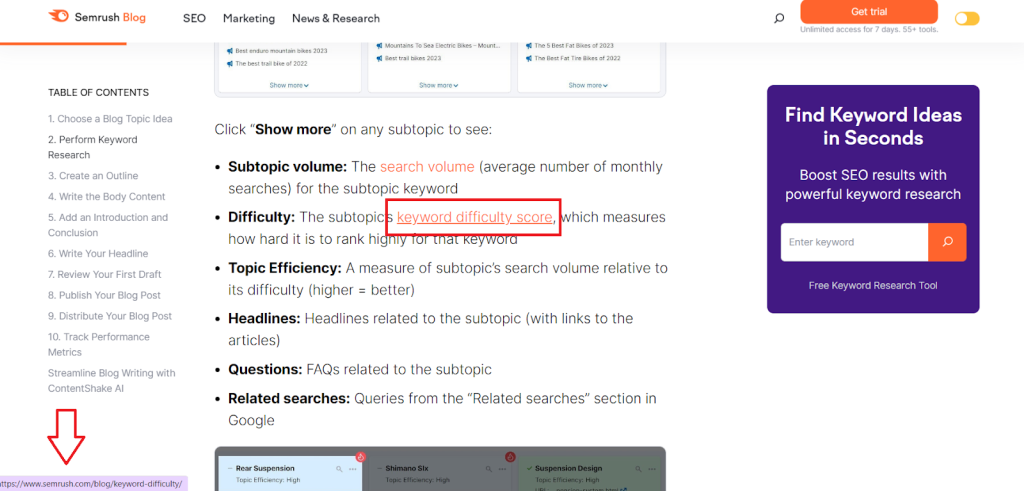
Internal linking is a practice where you hyperlink text within your own website to other relevant pages, enhancing navigation and SEO; simply highlight the text you want to link, click the hyperlink icon in your content editor, and paste the URL of the destination page.
Let’s take this example from Semrush. The anchor in this case is “keyword difficulty score” and the URL leads to another Semrush blog page related to keyword difficulty score.
Technical On-Page Optimization
Technical on-page optimization ensures that your website is structured, coded, and configured in a way that maximizes its visibility and performance in search engine results.
Site speed and performance
A fast-loading website not only enhances user experience but also plays a significant role in SEO rankings and conversion rates. Research indicates that users tend to abandon websites that take too long to load, leading to increased bounce rates and decreased engagement. Search engines like Google consider site speed as a ranking factor, prioritizing faster-loading websites in search results.
To optimize your website for speed and performance, several strategies can be implemented.
- Minimize HTTP requests and reduce the number of elements on each page, such as images, scripts, and stylesheets.
- Compress and optimize images to reduce file sizes without compromising quality.
- Utilize browser caching to store frequently accessed resources locally, reducing server load and load times for returning visitors.
- Employ content delivery networks (CDNs) to distribute content across multiple servers worldwide, ensuring faster delivery to users regardless of their geographical location.
Mobile Optimization
With a significant portion of web traffic coming from mobile devices, ensuring that your site is optimized for mobile provides a seamless and engaging user experience across all devices.
To optimize your website for mobile devices:
- Adopt a responsive web design approach that automatically adjusts the layout and content to fit different screen sizes and resolutions.
- Prioritize mobile-friendly features such as easy navigation, fast loading times, and optimized images and videos.
- Test your website’s mobile responsiveness using tools like Google’s Mobile-Friendly Test and make necessary adjustments to ensure compatibility across various devices and browsers.
- Implement accelerated mobile pages (AMP) to further improve loading speeds on mobile devices.
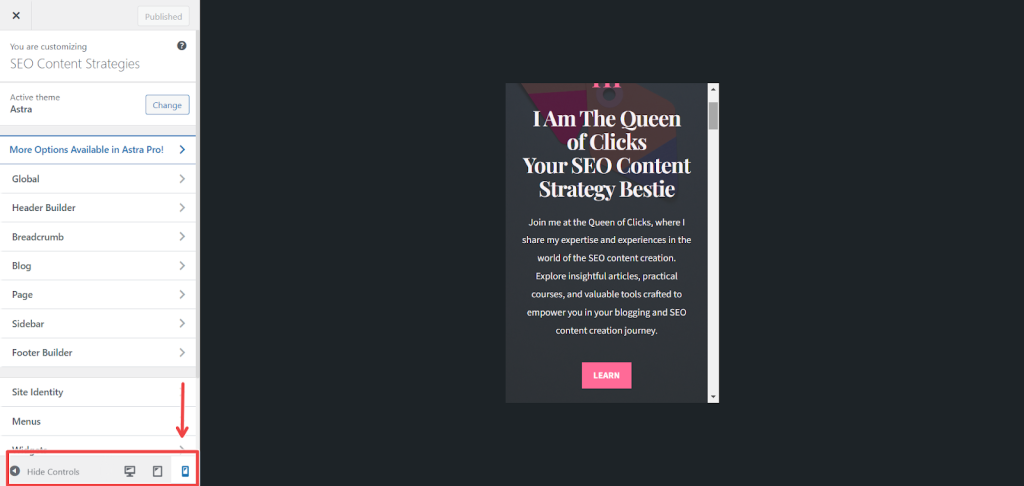
To see how your website looks on mobile devices on WordPress, go to your, click Customize, then Appearance, and at the bottom, select the mobile phone icon.
Structured data markup
Structured data markup, also known as schema markup, is a code added to a website’s HTML that provides search engines with additional information about the content on a webpage. This markup helps search engines better understand the context and meaning of the content, allowing them to display more relevant and rich results in search engine results pages (SERPs).
To implement structured data markup, you can use various schema markup formats, such as JSON-LD, Microdata, or RDFa, to annotate different elements of your content, such as products, recipes, events, and more. There are also several online tools and plugins available that can help you generate and implement structured data markup effectively, even if you’re not familiar with coding.
XML Sitemaps
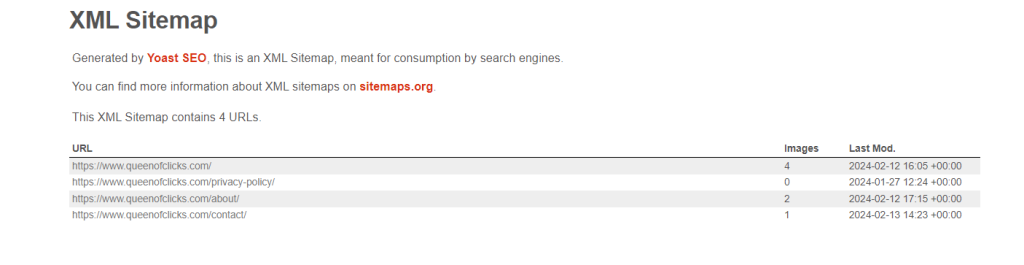
XML sitemaps are files that list all the URLs on a website, along with metadata about each URL, such as when it was last updated, how often it changes, and its priority relative to other URLs on the site. These sitemaps are written in XML format and submitted to search engines to help them crawl and index the website more efficiently.
XML sitemaps are important for several reasons:
- They provide search engines with a roadmap of a website’s structure, making it easier for them to discover and index all the pages on the site.
- They improve the overall visibility and ranking of the website in search engine results pages (SERPs).
- They allow website owners to provide additional information about their content, such as images and video thumbnails, which can enhance the appearance of search results.
To create an XML sitemap for your website, you can use online tools or plugins that generate sitemaps automatically based on your website’s structure and content. Once created, you can submit the XML sitemap to search engines like Google and Bing through their webmaster tools or search console interfaces. Regularly update the XML sitemap whenever new content is added to the website or existing content is modified to ensure that search engines have the most up-to-date information about your site.
For example, this is the sitemap Queen of Clicks, created with Yoast SEO.
Eliminating crawl errors
Crawling errors can occur when search engine bots encounter difficulties accessing and indexing a website’s content. These errors can negatively impact a website’s visibility and search engine rankings. Common crawling errors include broken links, server errors, and blocked resources. To eliminate crawling errors,
- Regularly monitor your website for issues using tools like Google Search Console and Bing Webmaster Tools.
- Identify and fix broken links and update URLs or implement redirects.
- Address server errors promptly and troubleshoot server issues or reach out to your hosting provider for assistance.
- Ensure that search engine bots can access all relevant resources, check and update your robots.txt file and remove any directives that may block crawling.
- Optimize your website’s internal linking structure to facilitate easier navigation for search engine bots.
Regularly monitoring and addressing crawling errors can help improve your website’s crawlability, visibility, and overall performance in search engine results pages.
Measure and Monitor Rankings and Traffic
Measure and monitor rankings and traffic to gauge the effectiveness of your SEO efforts and identify opportunities for improvement in your online visibility and audience engagement.
Use analytics to assess keyword and page rankings
Analytics tools help you assess keyword and page rankings to monitor website traffic effectively. With platforms like Google Analytics and other SEO tools, you can gain valuable insights into which keywords are driving traffic to their site and how individual pages are performing in search engine results pages (SERPs).
Analyzing keyword data allows you to identify high-performing keywords and optimize content accordingly while monitoring page rankings enables them to track the effectiveness of your SEO efforts over time.
Regularly review analytics data to identify trends, pinpoint areas for improvement, and make data-driven decisions to enhance your website’s visibility and performance in search results. Monitoring website traffic also enables you to understand user behavior, identify opportunities for engagement and conversion, and ultimately optimize your website better to meet the needs and preferences of your audience.
Track keyword and ranking progress over time
Tracking keyword and ranking progress helps evaluate the effectiveness of your SEO efforts and identify areas for improvement. Here is how to do it:
- Select a reliable keyword tracking tool or SEO platform that allows you to monitor keyword rankings regularly.
- Input your target keywords and track their rankings across different search engines and regions. Set up regular reporting intervals, such as weekly or monthly, to monitor changes in rankings over time.
- Analyze ranking fluctuations and trends to identify patterns and potential opportunities for optimization.
- Keep track of changes in search engine algorithms and industry trends that may impact keyword rankings.
Refine on-page optimization and content based on data
Refining on-page optimization and content based on data improves website performance and maximizes SEO impact. Analyze data from analytics tools to identify pages with high traffic, low bounce rates, and strong engagement metrics. Examine the keywords driving traffic to these pages and evaluate their relevance and competitiveness. Use this information to refine on-page optimization and incorporate high-performing keywords naturally into title tags, meta descriptions, headers, and body content.
Also, assess user behavior and feedback to identify areas for content improvement and expansion. Consider updating outdated content, adding multimedia elements, or addressing common user queries and pain points. Continuously monitor the impact of these optimizations on website performance, adjusting your strategy as needed to drive further improvements in search engine rankings, organic traffic, and user engagement.
🚀 Improve Your SEO for Your SaaS with Queen of Clicks
Ready to scale your SaaS business through search? At Queen of Clicks, we specialize in helping SaaS companies boost their organic visibility, attract high-intent traffic, and convert visitors into trial users and paying customers. Here’s how partnering with us can elevate your SEO strategy:
- Tailored SaaS SEO Strategy: We build a data-driven roadmap focused on high-intent keywords that match how SaaS buyers search.
- AI & LLM Optimization: We future-proof your content for AI-driven discovery and conversational search engines.
- Technical & On-Page SEO Excellence: From technical audits to on-page optimization, we improve crawlability, site speed, and semantic structure.
- Conversion-Focused Website Design: Our WordPress builds are fast, clean, and crafted to convert organic traffic into demos and signups.
- Strategic Content & Link Building: We create content aligned with your buyer journey and build authority with ethical, high-quality links.

If you’re ready to get found, convert more users, and grow with SEO that’s built for SaaS, let’s talk and build a strategy that truly clicks for your business.
Conclusion
With this visual guide to keyword targeting and on-page SEO, you can navigate the complexities of keyword research, optimize your on-page elements effectively, and enhance your website’s visibility and rankings on search engine results pages.
Continuous refinement of your SEO techniques and staying updated with industry trends will help you maintain a strong online presence and staying ahead of the curve. Start implementing these practices today and watch your website soar to new heights of success.
FAQs
Are there any common mistakes to avoid when implementing on-page SEO techniques?
Common mistakes to avoid when implementing on-page SEO techniques include keyword stuffing, neglecting to optimize meta tags and image alt attributes, using non-descriptive URLs, and ignoring mobile optimization. Additionally, overlooking the importance of high-quality, relevant content can hinder your SEO efforts.
What role does user intent play in keyword research and on-page SEO?
User intent helps determine the relevance of your content to search queries. Understanding the intent behind specific keywords allows you to create content that meets the needs and expectations of users, ultimately improving your chances of ranking higher in search engine results.
Can you provide examples of industries or niches where long-tail keywords are particularly effective?
Long-tail keywords are particularly effective in niche industries or specialized markets where users are searching for specific products, services, or information. Examples include healthcare, legal services, niche e-commerce products, and local businesses targeting specific geographic areas.
Is there a recommended frequency for internal linking within website content?
While there’s no strict rule for the frequency of internal linking, it’s recommended to incorporate internal links naturally within your content to provide additional value to users and enhance navigation. Aim to include internal links where they are contextually relevant and can guide users to related or relevant content within your website.