Importance of Technical SEO for SaaS Startups
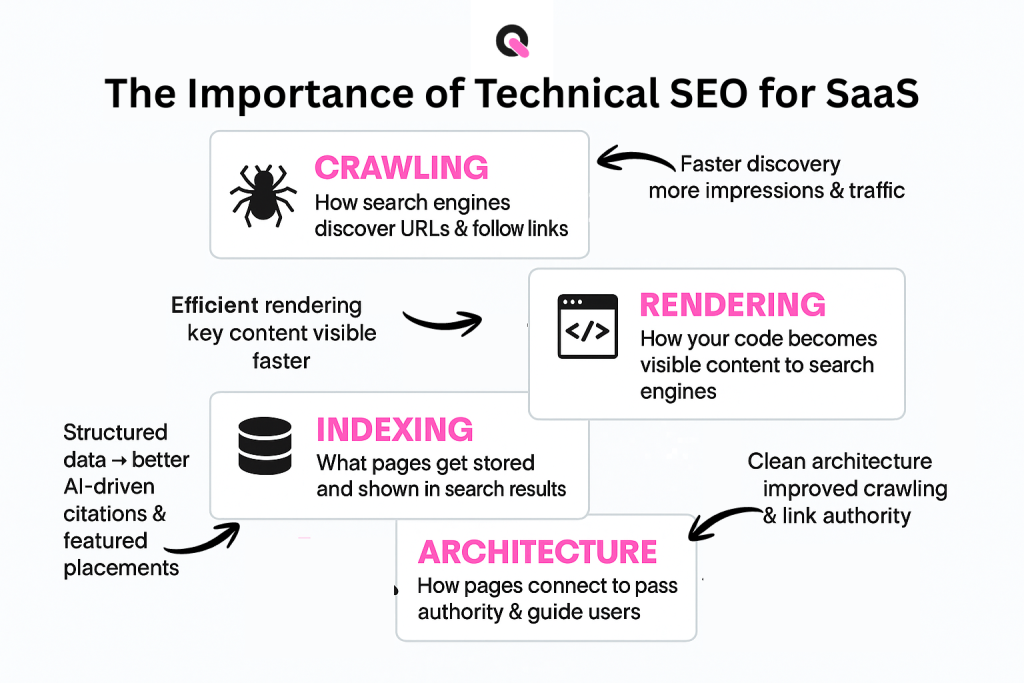
Technical SEO is the process of optimizing your website’s infrastructure, such as site speed, crawlability, indexing, and mobile performance, so search engines can efficiently access and rank your content.
So, what is the importance of technical SEO for SaaS startups? For SaaS startups, even the best product pages or high-intent content won’t generate traffic or conversions if search engines can’t properly discover or render them. It directly impacts visibility, user experience, and ultimately revenue. For example, according to Google, 53% of mobile users abandon a site that takes longer than 3 seconds to load.

Key Takeaways
- Clean site structure helps pages get indexed by search engines.
- Experts agree that access and clarity matter for visibility.
- Speed, tags, and data shape both user experience and rankings.
- Small SaaS sites still need a strong foundational setup.
- Investing in core fixes turns content into consistent traffic.
What Is Technical SEO
Technical SEO refers to the process of optimizing your website’s infrastructure so search engines can efficiently crawl, index, and understand your content. It focuses on behind-the-scenes elements like site speed, mobile-friendliness, URL structure, XML sitemaps, structured data, and fixing issues such as broken links or duplicate content.
Technical SEO for SaaS companies ensures that product pages, feature content, and high-intent landing pages are easily discoverable and perform well in search results, creating a strong foundation for sustainable organic growth.
What Is the Importance of Technical SEO for SaaS Startups
When bots visit your site, a clear structure helps them map pages fast. Brenda Malone stresses that a website must be effortlessly navigable and free of glitches to succeed.
Good structure and clean tags let search engines connect features, articles, and product pages. That clarity helps index content accurately and supports steady visibility over time.
Core checks, links, mobile layout, speed, and data markup reduce crawl issues. A focused optimization plan protects your foundation and improves performance for users.
- Well‑organized pages guide bots through product and help content.
- Fast page speed and mobile readiness boost rankings and user experience.
- Routine monitoring catches problems before they hurt traffic.
Why Technical Foundations Drive SaaS Growth
Clear site architecture turns hidden pages into regular sources of traffic. A clean backend removes crawl blocks so search tools can find your best product and help pages.
Boosting Organic Traffic
A strong foundation is the main driver for organic traffic. When a website has no crawl hurdles, search engines index pages faster and surface them to users who need solutions.
That visibility leads to steady increases in visits and better long-term rankings.
Generating Qualified Leads
Good structure guides visitors from discovery to action. Optimized navigation and fast page speed improve user experience and lift conversion rates.
When SaaS startups align technical strategy with content goals, they scale visibility and attract high-quality leads that last.
- Clean architecture improves indexation and reduces issues during crawls.
- Well‑tagged pages and correct data markup raise the chance of rich listings.
- Regular audits help maintain performance and sustain growth over time.
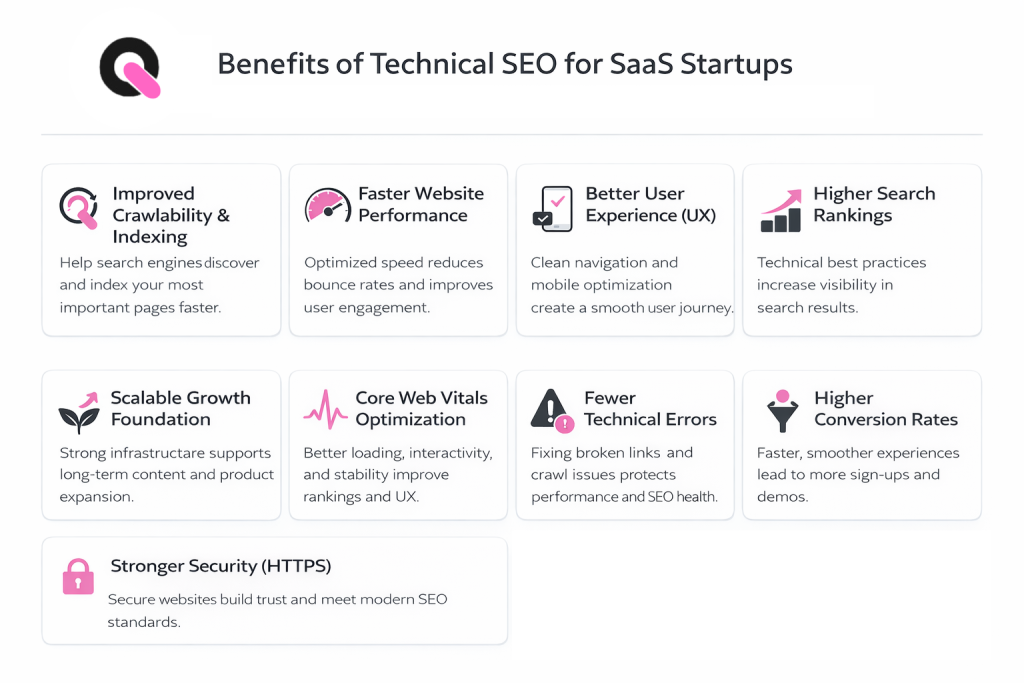
Benefits of Technical SEO for SaaS Startups
For SaaS startups, growth depends on more than just great features or strong messaging, it requires a solid technical foundation that allows search engines to properly access, understand, and rank your website.
Technical SEO ensures your product pages, blog content, and conversion paths are fully optimized for visibility, performance, and scalability. When done right, it turns your website into a reliable acquisition channel that supports long-term, compounding growth.
Below are the key benefits of technical SEO for SaaS startups:
Improved Crawlability and Indexing
Technical SEO ensures that search engines can efficiently crawl and index your website. When you optimize your site structure, fix broken links, and submit clean XML sitemaps, you help search engines discover your most important pages, like product features, landing pages, and high-intent blog content, faster and more reliably.
Faster Website Performance
Page speed is a critical ranking factor and a major driver of user experience. Technical SEO improvements like image optimization, code minification, and better server response times help your SaaS site load quickly, reducing bounce rates and increasing the chances of conversions.
Better User Experience (UX)
A technically optimized website is easier to navigate, mobile-friendly, and free of frustrating errors. This creates a smoother experience for users exploring your product, which can lead to longer session durations, more engagement, and higher trial or demo sign-ups.
Higher Search Engine Rankings
When your website meets technical SEO best practices, such as proper use of canonical tags, structured data, and optimized URLs, search engines are more likely to rank your pages higher. This increased visibility directly impacts your ability to attract qualified organic traffic.
Scalable Growth Foundation
Technical SEO builds a strong infrastructure that supports scaling your content and product pages over time. As your SaaS grows and you publish more content or expand features, a well-optimized technical setup ensures consistent performance and avoids issues that could limit growth.
Enhanced Core Web Vitals Performance
Optimizing for Core Web Vitals (loading speed, interactivity, and visual stability) improves both rankings and user satisfaction. SaaS startups that prioritize these metrics can gain a competitive edge in search results while delivering a smoother experience to potential customers.
Reduced Technical Errors and Downtime
Regular technical SEO audits help identify and fix issues like broken pages, duplicate content, redirect loops, and server errors. This keeps your site healthy and ensures users, and search engines, don’t encounter obstacles that could hurt your credibility or rankings.
Improved Conversion Rates
A fast, secure, and well-structured website builds trust and reduces friction in the user journey. Technical SEO contributes to better conversion rates, as it ensures that users can easily navigate from discovery to action, whether that’s signing up for a trial or booking a demo.
Stronger Security and Trust (HTTPS)
Implementing HTTPS and maintaining a secure website is not only a ranking factor but also essential for user trust, especially for SaaS platforms handling sensitive data. Technical SEO helps ensure your site meets modern security standards.
Common Technical Hurdles for SaaS Platforms
Duplicate pages quietly siphon authority and confuse search engine crawlers. Platforms that create many dynamic URLs often face this problem. Left unchecked, it reduces organic visibility and harms traffic.
Managing Duplicate Content
Many product sites generate extra landing pages and URL variants for features and campaigns. When search engines find the same content on multiple pages, they struggle to pick a canonical version.
Canonical tags are the standard fix. They tell the search engine which page to index and which copies to ignore. That stops pages from competing and concentrates ranking value.
- Audit regularly to find duplicate URLs and competing assets.
- Use clean URL patterns to prevent accidental copies.
- Remove or consolidate low-value pages to recover lost traffic.
Nick LeRoy notes that very large sites, think 500K pages, can carry deep technical debt that demands sustained resources. A Virayo case study showed that deleting competing pages restored organic visits and boosted the lead pipeline.
Optimizing Crawlability for Search Engines
Search bots need clear pathways to find and index your site’s crucial pages. When crawlers can move through a website with no dead ends, pages get discovered and ranked more reliably.
Start with a logical URL layout and tidy site structure. Clean paths help search engines map your content and prioritize the most valuable pages.
Use a well‑configured robots.txt file to guide bots away from staging areas and admin paths. Keep the file simple and test it after updates.
- Maintain an up‑to‑date XML sitemap so engines have a current roadmap to your best content.
- Monitor crawl errors in Google Search Console and fix broken links or server responses quickly.
- Avoid overly deep navigation; complex architecture can hide pages and cost organic traffic.
| Task | Why it matters | Quick action |
| URL structure | Better bot navigation | Use clear, consistent slugs |
| Robots file | Controls crawler access | Block staging, allow public pages |
| Sitemap | Signals current pages | Update after releases |
Prioritizing crawlability builds a sturdy foundation for long‑term search performance and improves visibility, traffic, and user experience.
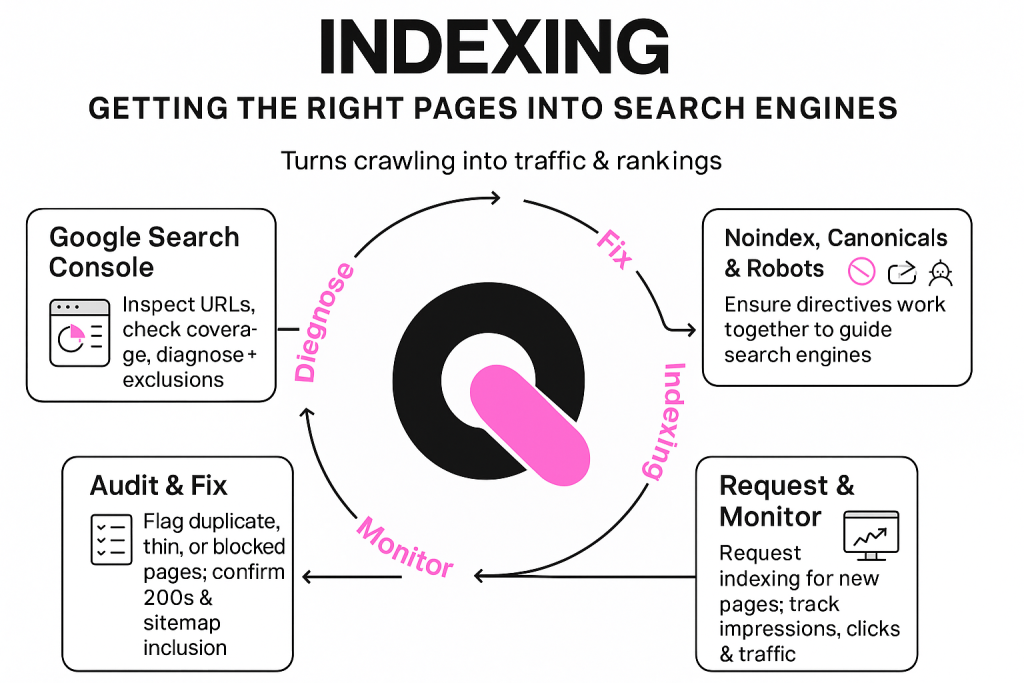
Mastering Indexation and Canonicalization
When a website tells engines which version to index, rankings and traffic stabilize quickly. Canonical tags mark the preferred URL and stop duplicate content from splitting value across copies.
Use canonical tags consistently. Review them after launches and campaigns to keep authority focused on your main pages. Apply noindex on low-value pages like thank-you screens and login portals so crawlers ignore them.
Proper indexation makes high-value content visible to potential customers during relevant search queries. If indexing breaks, even well-optimized pages may never appear in results and organic traffic drops.
- Audit canonical tags regularly to prevent page authority dilution.
- Mark non-public or thin pages with noindex to guide crawler attention.
- Pair structured data markup with clean index rules to enable rich results.
Adopt a disciplined review process. That maturity reduces crawl issues, raises visibility, and improves user experience across the site over time.
Enhancing Website Architecture and Navigation
Logical folders and labels help both visitors and crawlers spot priority pages. Good layout reduces friction and raises visibility across the site.
Logical Hierarchy
Group product, help, and blog content into clear categories. This lets search engines map relationships and spread link equity to key pages.
Keep depth shallow: aim for important pages reachable in three clicks or fewer. That boosts user experience and cuts crawl issues.
Breadcrumb Navigation
Breadcrumbs show a user where they are and let them move up the structure quickly. That simple aid lowers bounce rates and increases time on page.
Use consistent tags and data in breadcrumbs so engines read them correctly and surface richer listings in search results.
- Intuitive menus and site search help users find value fast.
- Strategic internal linking guides visitors toward product and lead pages.
- Organize content into clear categories to improve crawling and traffic.
| Element | Benefit | Quick action |
| Hierarchy | Better crawl mapping | Group pages by topic |
| Breadcrumbs | Lower bounce rates | Implement structured markup |
| Internal links | Spread link equity | Add contextual links |
Improving Core Web Vitals and Site Speed
Fast load times turn casual visitors into engaged users and signal healthy site performance. Core web vitals measure loading, interactivity, and visual stability to give a clear view of user experience.
Mobile traffic now dominates, so mobile-first checks matter. Prioritize responsive layouts and test pages on real devices to spot issues that hurt rankings and retention.
Common fixes often lift performance quickly: compress images, minify CSS and JavaScript, and enable browser caching. These steps reduce load times and lower abandonment rates.
- Use a CDN to serve assets closer to global users.
- Defer noncritical scripts and preload key resources.
- Audit largest contentful paint and cumulative layout shift metrics regularly.
| Problem | Quick Fix | Benefit |
| Large images | Compress and use modern formats | Faster page loads |
| Render-blocking CSS/JS | Minify and defer | Improved interactivity |
| Poor caching | Set appropriate headers | Repeat visits load faster |
Investing in core web vitals is high ROI: it signals to search engines that your website is modern, reliable, and tuned for users. That lifts visibility and long-term traffic.
Leveraging Structured Data for Rich Results
Rich results come when a site shares clear, machine-readable context about its pages. Using structured data and schema helps search engines surface more engaging snippets.
Schema markup gives engines explicit signals about your content. Add BreadcrumbsList to show hierarchy. Add FAQ schema to let questions and answers appear in results. These cues boost click-through rates and help users find answers fast.
Implement schema on product pages, help articles, and pricing pages. Test markup with a structured data validator and watch how snippets change in search. Good markup also improves the odds of being used in AI summaries and other search features.
- Use BreadcrumbsList schema to map site structure.
- Apply FAQ schema to key Q&A sections to earn rich snippets.
- Validate and monitor markup to avoid common issues.
| Schema Type | Best Placement | Primary Benefit |
| BreadcrumbsList | Site navigation, category pages | Clear path for users and crawlers |
| FAQ | Help center, product pages | Higher CTR via rich snippets |
| Product/Offer | Pricing and feature pages | Enhanced listings and conversions |
Strengthening Website Security and Trust
A secure website signals reliability to customers and to ranking systems alike.
SSL and HTTPS encrypt data between browsers and servers. This protects payment details and personal info and tells search engines your site meets modern security standards.
Two-factor authentication (2FA) limits unauthorized access to admin panels and customer accounts. It reduces breaches and shows users you prioritize their safety.
- Use a strict Content Security Policy (CSP) to block unwanted scripts and stop XSS attacks.
- Keep certificates and server software updated to prevent known vulnerabilities.
- Monitor logins and apply rate limits to reduce brute-force attempts.
Why it matters: secure pages raise trust, help retain customers, and can lift search visibility. Regular security reviews protect content and keep site performance stable. That stronger trust can improve conversion rates and the overall user experience.
| Measure | What it protects | Quick win |
| HTTPS / SSL | Data in transit, user trust | Install valid certificate, enable HSTS |
| Two‑Factor Auth | Accounts and admin access | Enable 2FA for all admins |
| Content Security Policy | Script injection, XSS | Define allowed sources, test in report-only |
| Routine updates | Known exploits and malware | Schedule monthly patch checks |
Essential Technical SEO Audit Strategies
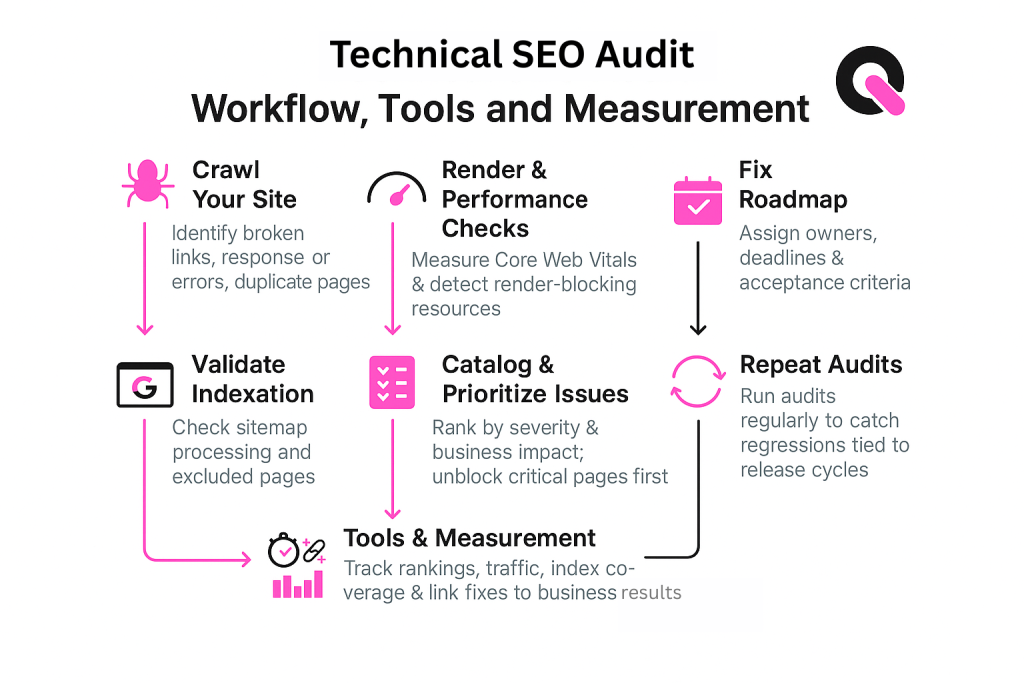
Run a full SEO audit to uncover hidden blockages that stop search engines from finding your best pages. A short, repeatable checklist surfaces sitemap errors, robots rules, and crawl failures so you can act fast.
XML Sitemap Management
Keep a clean sitemap that lists only canonical pages and recent blog posts. Submit it to Google Search Console and update it after launches to speed indexing.
Remove low-value or duplicate pages from the sitemap. That concentrates crawl budget on pages that drive organic traffic and conversions.
Robots File Configuration
Use robots.txt to block staging paths and allow public directories. Test changes in a sandbox before publishing to avoid accidental blocking of important pages or assets.
Pair the robots rules with consistent meta canonical tags so engines know which URL to index and which to ignore.
Monitoring Crawl Errors
Track 404s, server 5xx responses, and redirect chains weekly. Fix broken links and bad responses to prevent wasted crawl time and declining site speed.
Tools like Screaming Frog and Ahrefs speed audits and find broken links, crawl loops, and other SEO issues. A Virayo client saw a 50% jump in new trial sign-ups after a focused audit.
- Prioritize fixes that improve pages with high traffic or conversion rates.
- Review meta tags and canonical settings regularly to keep search results accurate.
- Use a mix of automated crawlers and manual checks to catch subtle errors.
🚀 How Queen of Clicks Empowers SaaS Success
Queen of Clicks turns complex site challenges into clear roadmaps that boost organic lead flow.
We deploy data-driven technical SEO strategies to make your pages easier to find and index by major engines. Our team audits architecture, fixes crawl issues, and tightens performance so content wins traffic that converts.
What we will do:
- Optimize site structure so search engines crawl high-value product pages first.
- Improve page speed and UX to lift trial sign-ups and reduce churn.
- Resolve indexation issues and align content with business goals.
If traffic and leads are stalled, book a call with our team to discuss a tailored plan that scales organic growth and improves conversion rates.

Conclusion
Fixing crawl blocks and index rules unlocks steady gains in organic traffic. Treat this as a routine task so search and user signals stay aligned and visible to any search engine that scans your site.
Focus on clear site structure, fast page loads, and accurate markup. That reduces issues that hide content and helps pages rank. Regular audits catch errors early and keep your technical SEO tuned.
When content, architecture, and performance work together, engines find your best page versions and reward them with more clicks. Implement these steps and your platform will be easier to find, use, and grow.
FAQs
How often should SaaS startups run a technical SEO audit?
At a minimum, run a full audit quarterly. However, fast-growing SaaS startups should monitor critical issues (like crawl errors and site speed) monthly or even weekly to prevent performance drops.
Is technical SEO more important than content for SaaS companies?
Neither is more important, they work together. Technical SEO ensures your content is discoverable and indexable, while content drives relevance and conversions. Without technical SEO, even great content won’t perform.
What are the most common technical SEO mistakes SaaS startups make?
Common mistakes include poor site structure, slow page speed, duplicate content from dynamic URLs, missing canonical tags, and ignoring mobile optimization.
Do small SaaS startups really need technical SEO early on?
Yes. Even small SaaS websites need a clean foundation. Fixing technical issues early prevents bigger scalability problems and ensures future content can rank effectively.
What tools can SaaS startups use for technical SEO?
Popular tools include Google Search Console, Screaming Frog, Ahrefs, and PageSpeed Insights. These help identify crawl issues, indexing problems, and performance bottlenecks.