Content Pruning for SaaS Companies: A Comprehensive Guide
Content pruning for SaaS companies is the strategic process of auditing your site and removing, consolidating, redirecting, or de-indexing outdated, irrelevant, or underperforming pages so that search engines and users see only your highest-value content.
SaaS businesses that skip pruning often end up with “content bloat,” where weak pages dilute topical authority, waste crawl budget, and compete with your best assets, as 66% of pages on the average website get zero organic search traffic. Content pruning stops that dead weight from dragging down rankings, streamlines user experience, and helps your strongest content perform at its full potential.
Key Takeaways
- Pruning clarifies priorities: keep pages that serve users and search.
- Audit with data to decide whether to refresh, merge, or remove.
- Staged changes reduce risk and reveal real results.
- SaaS sites create sprawl; stale information can hurt conversions.
- Make pruning a repeatable workflow, not a single project.
What Content Pruning Means for SaaS Websites
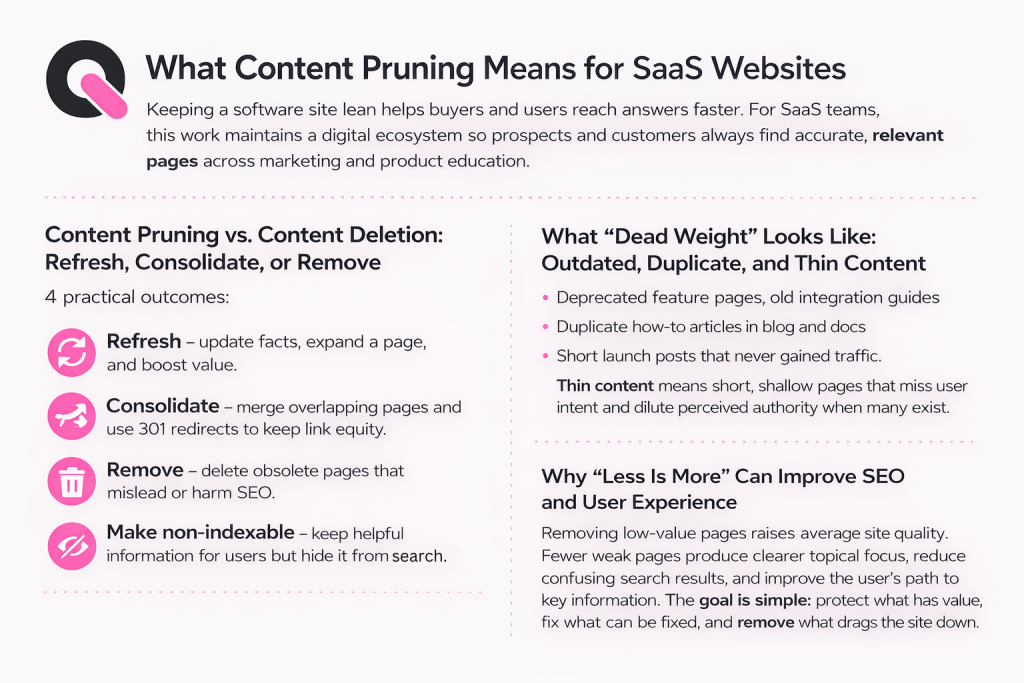
Keeping a software site lean helps buyers and users reach answers faster. For SaaS teams, this work maintains a digital ecosystem so prospects and customers always find accurate, relevant pages across marketing and product education.
Content Pruning vs. Content Deletion: Refresh, Consolidate, or Remove
Four practical outcomes:
- Refresh — update facts, expand a page, and boost value.
- Consolidate — merge overlapping pages and use 301 redirects to keep link equity.
- Remove — delete obsolete pages that mislead or harm SEO.
- Make non-indexable — keep helpful information for users but hide it from search.
What “Dead Weight” Looks Like: Outdated, Duplicate, and Thin Content
Dead weight shows up as deprecated feature pages, old integration guides, duplicate how-to articles in blog and docs, or short launch posts that never gained traffic. Thin content means short, shallow pages that miss user intent and dilute perceived authority when many exist.
Why “Less Is More” Can Improve SEO and User Experience
Removing low-value pages raises average site quality. Fewer weak pages produce clearer topical focus, reduce confusing search results, and improve the user’s path to key information. The goal is simple: protect what has value, fix what can be fixed, and remove what drags the site down.
Why Pruning Content Improves Organic Traffic and SEO Performance
A focused cleanup raises a site’s signal so the best pages win search placement.
Removing low-value pages clears weak quality signals, thin, duplicate, or outdated pages, that can lower site relevance. That lets Google prefer fresher, helpful pages and improves the overall SaaS SEO performance.
Fewer overlapping pages reduces keyword cannibalization. When one authoritative page remains, it ranks more confidently than several weaker rivals fighting the same queries.
Smarter Crawl Budget Usage
For large SaaS sites with 10,000+ pages, bots spend limited time crawling. Prioritizing product, feature, and high-intent pages ensures search engines index what matters most.
Stronger Authority Distribution
Consolidate and redirect similar URLs to preserve backlinks and concentrate link equity on priority pages. This boosts authority where it drives conversions.
Better Visitor Experience and Measurable Results
Clear navigation and up-to-date pages reduce dead ends and friction for buyers. The result is improved rankings, better-qualified traffic, and higher conversion rates.
- Remove weak pages to lift site trust.
- Merge overlaps so one page can rank.
- Redirect correctly to protect link value.
| Issue | Effect on SEO | Practical Fix |
| Thin or outdated pages | Lower overall quality signal | Refresh or remove |
| Duplicate topics | Keyword cannibalization | Consolidate and 301 redirect |
| Low-value indexed pages | Wastes crawl budget | Make non-indexable or remove |
| Scattered backlinks | Weak authority on priority pages | Merge and preserve links |
Warning Signs Your Content Needs Pruning
When your most important pages lose visibility, it usually signals a systemic problem. Watch a few simple site metrics and act quickly to avoid compounding harm.
Declining Impressions, Rankings, or Site Traffic
Signals: steady drops in impressions, falling rankings, or month-over-month traffic decline for priority pages.
These patterns can mean an intent mismatch, internal competition between similar pages, or perceived staleness across a topic cluster.
High Bounce Rates and Low Engagement on Key Pages
High bounce or short time on page suggests the page fails to answer queries or route visitors to next steps.
Low engagement is often a cue to update facts, improve UX, or merge weak pages into a stronger hub.
Broken Links, Link Rot, and Outdated Information
Link rot is a compounding problem: over the years many external references disappear. Broken references harm credibility and harm user trust. Flag and fix them during an audit.
Duplicate Topics Across Blog, Docs, and Landing Pages
Multiple teams can publish similar articles across blog, docs, and landing pages. That duplication dilutes rankings and confuses users.
Treat these warning signs as triggers to build an inventory and run a data-driven audit instead of guessing which URLs to remove.
- Diagnostic checklist: falling impressions, low rankings, low engagement, broken links, duplicate topics.
- If two or more items hit, schedule an inventory and audit for that topic or section.
| Issue | Signal | Next step |
| Intent mismatch | Drop in rankings for query cluster | Reassess target query and update page |
| Engagement failure | High bounce, low time on page | Improve answers and CTAs |
| Link rot / outdated info | Broken external links, old references | Replace or archive resources |
Define Scope and Goals Before You Prune Content
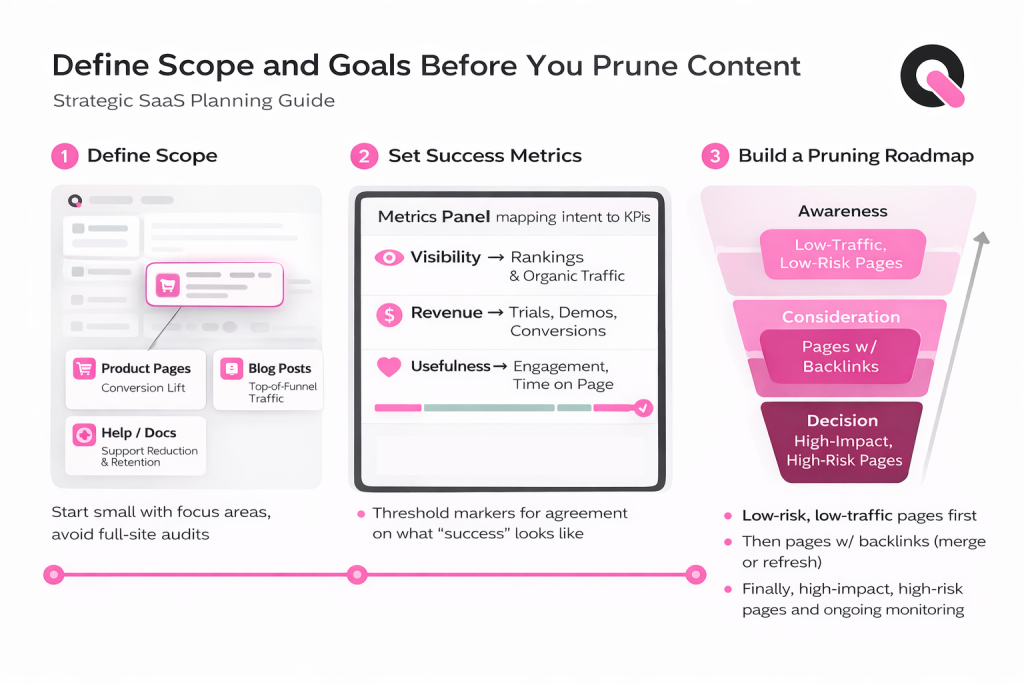
Before editing a single URL, agree on scope, success criteria, and a practical roadmap. Auditing an entire site wastes time. Start with the area tied to your business goals so the work delivers measurable value.
Choosing the Right Section to Audit
Decide which area to review first: product pages, blog posts, or help articles. Pick the type that aligns with your immediate goal.
- Product pages — focus on conversion lift.
- Blog posts — drive top-of-funnel organic traffic.
- Help/Docs — reduce support load and boost retention.
Setting Success Metrics
Define clear metrics and match each to intent. Use rankings and organic traffic for visibility. Track conversions for trials or demos. Measure engagement for usefulness.
Agree on target thresholds before changes so the marketing and product team know what “good” looks like.
Building a Pruning Roadmap That Matches Your SaaS Funnel
Map audit work to funnel stages: awareness, consideration, decision. Sequence by impact and risk.
- Low-risk, low-traffic pages first.
- Then merge or update pages with backlinks.
- Finally, test changes on high-stakes pages and monitor metrics over time.
Build a Content Inventory That Captures Every URL
Start with a single source of truth: a spreadsheet listing every unique URL and asset your SaaS site exposes to users or search engines. You can’t clean what you can’t see.
Gathering URLs from multiple systems
Pull exports from your CMS, landing-page lists in analytics, search performance reports, crawl exports, and backlink tools. Combine them and remove duplicates so the final list shows unique URLs only.
Include PDFs, videos, and images
Non-HTML assets often carry links and rank in search. Add PDFs, embedded videos, and key images to the inventory so broken or duplicated files are not missed.
Document intent, audience, and target queries
For each URL record the goal, the target audience or persona, and the primary query the page should satisfy. This layer helps reveal intent mismatch during the audit step.
- Why: legacy or hidden pages still get crawled; an inventory finds them.
- Sources: CMS export, analytics landing pages, search exports, crawl, backlink tools.
- De-dup rule: keep one canonical URL per resource.
| Field | Example value | Why it matters | Action |
| Lifecycle stage | Consideration | Prioritizes audit work | Refresh or consolidate |
| Feature area | Reporting | Groups similar pages | Merge overlaps |
| Integration partner | Payments API | Preserve backlinks | Protect or redirect |
| Primary conversion | Start trial | Tracks business impact | High priority |
Run a Content Audit Using Data, Not Guesswork
Run an evidence-led review so every URL is judged by metrics, not opinion. Use a consistent SEO audit to settle debates and protect SEO value. The reporting window should cover the last 12 months to capture seasonality, launches, and budget cycles.
Measure Total Traffic vs. Organic Traffic
Compare total traffic and organic traffic for the past year. This reveals pages that perform via paid or email but fail in search, and vice versa. Flag pages with high total visits but low organic visits for further review.
Evaluate Conversions and Engagement by Page Type
Check conversions, assists, bounce rate, and time on page for each page type. A low-ranking help article may still assist demos. Don’t remove a URL that quietly helps pipeline.
Detect Thin Content, Intent Mismatch, and Cannibalization
Use crawl word-counts to find thin content. Label pages with intent mismatch or over-optimization so teams apply fixes consistently. Scan titles, H1s, and ranking queries to spot cannibalization, nominate a primary page, and improve the SEO content for your SaaS.
Internal Links and Backlinks
Audit internal navigation to find buried pages that need link support. Before removal, review backlinks to avoid deleting a URL with external authority.
| Check | Signal | Action |
| Traffic split | Total vs organic drop | Investigate paid vs search sources |
| Engagement | High assists, low conversions | Keep and optimize CTAs |
| Thin content | Low word count, high bounce | Expand or merge |
| Backlinks | External links present | Preserve or redirect |
Choose the Right Pruning Action for Each Page
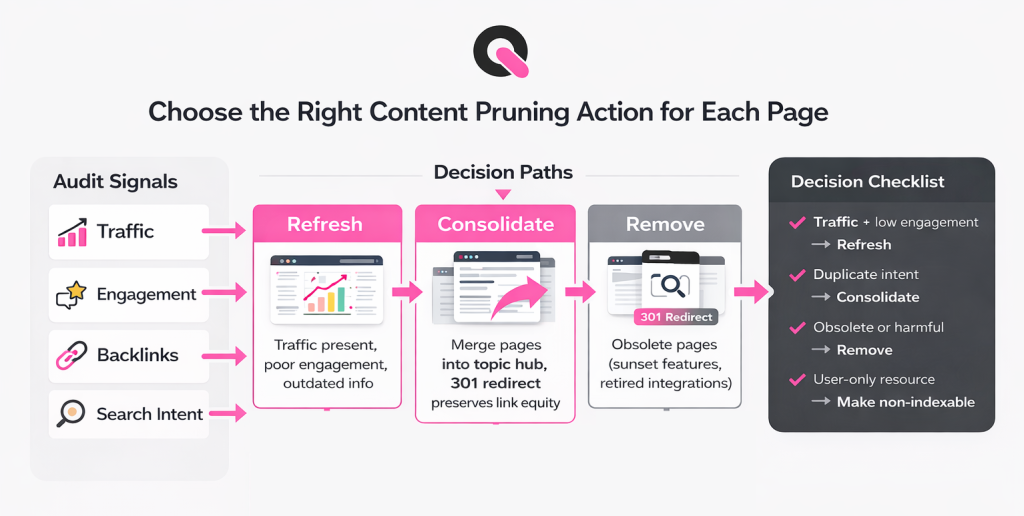
A clear decision framework maps audit signals to an action so teams move quickly and consistently. Use simple triggers (traffic, backlinks, intent) to decide whether to refresh, consolidate, remove, or make non-indexable.
Refresh: Update Accuracy, Expand Value, and Improve On-Page SEO
If a page has traffic but poor engagement, update facts, add missing sections, and improve headings and meta tags. Fix misleading advice that could harm buyer trust and add fresh examples or screenshots to raise usefulness.
Consolidate: Merge Overlapping Pages Into a Stronger Topic Hub
When several URLs compete for the same query, merge them into one hub. Combine the best material, keep the strongest URL, and use a 301 redirect to preserve authority and backlinks.
Remove: When Pages Are Obsolete, Harmful, or Have No Future Value
Delete only when a page is truly obsolete: sunset features, retired integrations, or incorrect compliance guidance. If removal risks traffic loss, archive and redirect instead of leaving broken links. Example: retire an outdated API guide and redirect users to the new integration docs.
Make Non-Indexable: When a Page Helps Users but Not Search
Some resources (internal lists, tag indexes, or PDFs meant for customers) are useful but add no search value. Mark them noindex or canonicalize PDFs via headers so they assist users without competing in search.
- Decision checklist: traffic + engagement = refresh; duplicate intent = consolidate; obsolete = remove; user-only resource = make non-indexable.
Implement Changes Safely Without Losing Rankings
Implementing changes the right way keeps hard-won rankings intact while you tidy a site. Execution is where many projects fail: a strong audit can be undone by broken links, redirect chains, or deleting pages that still drive traffic.
Use 301 Redirects to Preserve Link Equity and Avoid Broken Journeys
When you consolidate or remove URLs that have backlinks or meaningful traffic, apply a 301 redirect to the chosen canonical page. This preserves authority and keeps users from landing on dead pages.
Prefer 301s for merged pages and retired resources with referral visits. Avoid temporary redirects for permanent moves.
Clean Up Internal Links to Prevent Redirect Chains
Update internal links before or right after redirects. Redirect chains waste crawl budget and frustrate visitors.
Mandatory step: replace old URLs in navigation, sidebars, and body links so every path points directly to the final URL.
Roll Out in Stages and Measure Impact Over the Next Few Weeks
Group URLs into severity buckets: no traffic/no links first; low traffic/some backlinks next; high-risk pages last. This staged rollout reduces risk.
Wait about 1–3 weeks between batches to measure impact and avoid confounding other site changes. Track rankings, organic visits, and referral links to attribute results.
- Why implementation fails: broken links, redirect chains, and accidental deletions undo audit gains.
- Use 301 redirects for URLs with backlinks or traffic to preserve link equity and user journeys.
- Clean internal links to eliminate chains and improve crawl efficiency.
- Staged rollouts and a 1–3 week measurement cadence help isolate impact and protect performance.
- Quality control: crawl the site after changes, verify key redirects, and confirm priority pages get direct internal links.
| Check | Action | When |
| Backlinks present | 301 redirect | During consolidation/removal |
| Internal links to old URL | Update to final URL | Before or immediately after redirect |
| Post-change audit | Full crawl & verify | Within 48–72 hours |
Make Content Pruning a Repeatable Maintenance Workflow
Turn routine cleanup into a simple, scheduled habit that keeps your site healthy and searchable. Treat this as ongoing work, not a one-off project.
How Often to Review: Batch Cadence by Site Size
Rule of thumb: assess every six months for sites up to 1,000 pages and every three months for larger sites. Run light monthly checks to catch urgent drops or broken links.
Governance for Multi-Author, Cross-Functional Teams
Assign topic owners in product, docs, and marketing. Give each owner a list of pages and a cadence for review. Use a central calendar to avoid overlap and duplication.
Track Expiring Information and Schedule Updates
Tag pages with expiry risk: pricing assumptions, feature availability, or regulatory guidance. Schedule automatic reminders so teams update or archive before accuracy degrades.
- Workflow: quarterly inventory refresh, monthly performance check, defined escalation path for conflicts.
- URL best practice: avoid years in links unless necessary to reduce future updates.
| Frequency | Action | Owner |
| Monthly | Health checks & emergency fixes | SEO / Site Ops |
| Quarterly | Inventory refresh and prioritized audits | Topic owners |
| 6–12 months | Deep review for small sites; larger sites shorten to 3 months | Cross-functional leads |
🚀 How Queen of Clicks Helps SaaS Teams Win With SEO
Queen of Clicks turns audit findings into a practical roadmap that protects traffic and improves ROI. We blend data, clear metrics, and a tested pruning process so teams make confident changes with measurable impact.
Structured Support That Turns Audits Into Measurable SEO Results
We start with a full audit and inventory that captures every URL, asset, and user-facing page. Each item is labeled, outdated, thin, duplicate, or intent mismatch, so decisions are evidence-based.
Next, we prioritize by traffic, intent, conversions, and risk. That sequencing limits exposure and maximizes performance gains as you roll out updates.
How we help:
- Content inventory + audit that captures every URL and scores pages by traffic, engagement, conversions, and SEO signals.
- Clear pruning decisions per page: refresh, consolidate, remove, or make non-indexable with defined metrics.
- Safe implementation support: 301 redirect mapping, internal link cleanup, and staged rollouts to protect rankings and journeys.
- Ongoing governance: scheduled updates and standards to prevent topic overlap across teams.

What You Can Expect When You Book a Call
On a kickoff call we align goals, success metrics, and owners. Then we map actions, schedule staged rollouts, and set measurement windows so outcomes are clear.
- ROI-driven system: prioritization based on traffic, intent, conversions, and risk.
- Audit deliverables: inventory view, issue labeling, and recommended actions per URL.
- SEO protection: 301 redirect planning, internal link cleanup, and post-deploy validation.
- Measurable results: improved organic traffic to priority pages, reduced cannibalization, and clearer authority paths.
- Cross-team collaboration: align marketing, product, and owners so updates ship on schedule.
Book a call with Queen of Clicks: schedule a review of your biggest page opportunities and build a pruning roadmap tied to pipeline and growth.
Conclusion
Close the loop with a repeatable content pruning process: inventory → audit → decide fate → implement safely → measure. Follow that order so each step builds on data and reduces risk to rankings and user journeys.
Use the core decisions, refresh, consolidate, remove, or make non-indexable, based on traffic, backlinks, and intent. Protect link equity with 301 redirects and clean internal links to avoid chains and broken experiences.
Roll out changes in stages over 1–3 weeks, track metrics, and watch organic traffic and authority concentrate on priority pages. This steady approach improves crawl budget use, lifts average site quality, and delivers measurable SEO results.
Make this a scheduled habit. Regular audits keep pages accurate for users and preserve long-term performance. If you need help, Queen of Clicks can turn audit findings into a safe, staged roadmap and clear results.
FAQs
Can content pruning hurt SEO if done incorrectly?
Yes. Poor pruning decisions, like deleting pages with backlinks, removing URLs without redirects, or pruning based on traffic alone, can cause ranking drops. That’s why SaaS pruning must be data-led and paired with proper redirects, internal link updates, and staged rollouts.
How long does it take to see results from content pruning?
Most SaaS sites see early signals (crawl efficiency, indexing changes) within 2–4 weeks. Meaningful ranking and traffic improvements usually appear within 1–3 months, depending on site size, crawl frequency, and how aggressively overlaps were resolved.
Should early-stage SaaS companies prune content?
Yes, but selectively. Early-stage SaaS teams should prune misleading, duplicate, or abandoned pages, while preserving experimental or exploratory content that supports positioning. The goal isn’t to shrink the site, but to avoid scaling low-quality content as the company grows.
Is content pruning more important for large SaaS websites?
Yes. Large SaaS sites suffer most from crawl budget waste, internal competition, and outdated documentation. The bigger the site, the higher the SEO upside from pruning, and the higher the risk if it’s skipped.
Can content pruning improve conversions, not just traffic?
Yes. Pruning removes friction from buyer journeys. When prospects land on accurate, focused pages instead of outdated or overlapping ones, they move faster toward trials, demos, or signups, especially on product and comparison pages.
How does content pruning affect internal linking strategy?
Pruning simplifies internal linking and reduces clutter. Fewer URLs make it easier to route authority toward priority pages, strengthen topic hubs, and avoid linking to pages that no longer deserve visibility.
Does content pruning replace content creation for SaaS SEO?
No, it sharpens it. Pruning improves the performance of existing content so new pages launch into a cleaner, stronger site. Most high-performing SaaS SEO programs alternate between pruning cycles and targeted content creation.
Who should own content pruning inside a SaaS company?
Ownership should sit with SEO or growth marketing, but execution requires collaboration across product, documentation, and marketing teams. Without clear ownership, pruning stalls, or worse, important pages get removed without context.
How do you prioritize pruning when resources are limited?
Start where risk is lowest and impact is highest: zero-traffic pages with no backlinks, duplicated blog topics, and outdated feature content. Avoid touching high-conversion or high-link pages until simpler wins are completed.